
Acer Chromebook Plus 515 (CB515-2HT-33M4) Review: Large-Screen ChromeOS with Google AI on Board
Product Context
The Acer Chromebook Plus 515 (model CB515-2HT-33M4) is part of Acer’s 15.6-inch Chromebook Plus line, designed to showcase Google’s updated ChromeOS experience with built-in AI features. It sits in the mid-range of Chromebooks: more capable than entry-level models with basic Celeron/N-series chips, but below premium metal ultrabooks.
Key hardware highlights include:
- 15.6" Full HD (1920 × 1080) IPS touch display with a matte ComfyView finish.
- 13th Gen Intel Core i3-1305U (5-core hybrid processor).
- 8GB LPDDR5X RAM and 256GB PCIe NVMe SSD.
- Wi-Fi 6E (Intel AX211) and Bluetooth for modern wireless connectivity.
- 1080p FHD webcam with integrated microphone.
- ChromeOS with Chromebook Plus and Google AI features.
This configuration is aimed at users who want:
- A large, comfortable screen for multitasking, documents, and streaming.
- Enough performance for heavy web workloads, virtual meetings, and Android apps.
- A system that stays responsive over years of Chrome updates.
Compared with many smaller 11–14 inch Chromebooks, the Plus 515 prioritizes screen size and performance over ultra-portability. It’s best thought of as a home, office, or classroom machine that can be moved around when needed rather than an always-on-the-go ultraportable.
You’ll typically find this model around $418.00 on its product page, depending on sales and regional availability.
Feature Breakdown
Design and build
The Chromebook Plus 515 uses a classic 15.6-inch clamshell chassis. While not a premium all-metal build, it feels reasonably solid for its category.
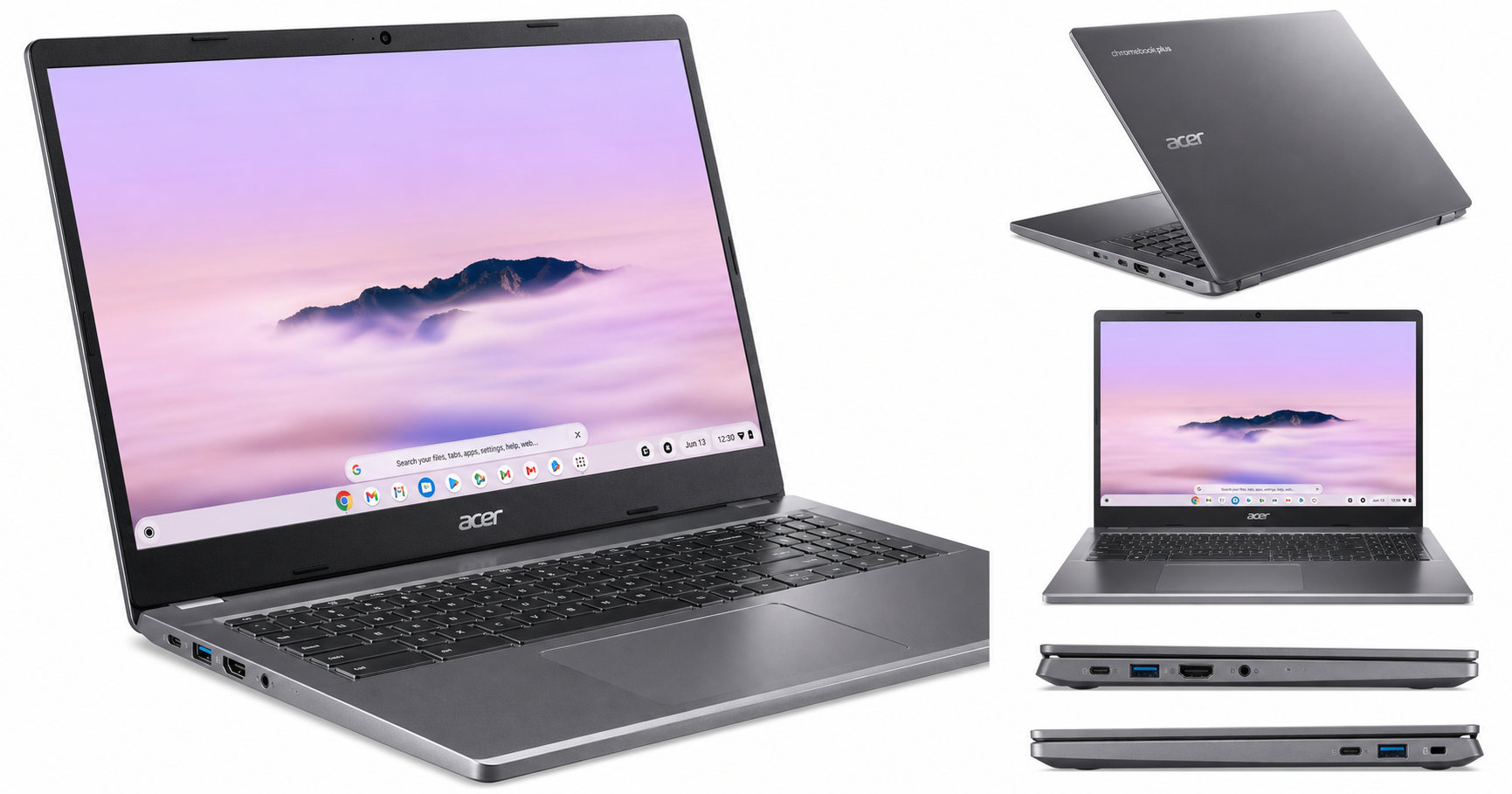
- Dimensions & weight: Approximately 0.79" thick, 14.2" wide, 9.4" deep, and about 3.7 lb. (acer.com)
- Finish: Acer’s "Iron" color with a clean, modern look suitable for school or office.
- Hinges: The hinge allows the display to tilt comfortably for desk use but does not convert into a tablet; this is a standard laptop, not a 2‑in‑1.
Display
The display is a strong point for productivity and media consumption:
- 15.6" Full HD (1920 × 1080) resolution provides ample workspace for multiple Chrome windows and split-screen apps.
- IPS panel for wide viewing angles and better color consistency than TN panels.
- Touchscreen support, useful for Android apps, casual browsing, and on-screen navigation.
- ComfyView (matte) coating, which helps reduce reflections under office or classroom lighting. (acer.com)
Color accuracy and brightness are typical mid-range Chromebook levels: good enough for office work, web, and streaming, but not calibrated for color-critical creative work.
Processor and memory
Inside, the CB515-2HT-33M4 is powered by:
- Intel Core i3-1305U, a 13th Gen chip with 5 cores (2 performance, 3 efficiency) and hyper-threading support, designed to balance performance and power usage. (acer.com)
- 8GB LPDDR5X memory, soldered to the board (not user-upgradable), which is the standard configuration for Chromebook Plus devices.
This combination comfortably exceeds Google’s baseline Chromebook Plus requirements, giving you noticeably more headroom than older Celeron- or Pentium-based Chromebooks.
Storage
For storage, Acer equips this model with:
- 256GB PCIe NVMe 3.0 SSD (M.2 form factor), significantly faster than eMMC storage and more generous than the 64–128GB you often see in budget devices. (acer.com)
While local storage is less critical on Chromebooks than on Windows laptops due to cloud integration, having a fast 256GB SSD makes a difference for offline files, Android apps, and Linux containers.
Connectivity and ports
The Chromebook Plus 515 offers a practical port selection for everyday use:
- 2 × USB 3.2 Gen 1 Type‑C (data, display, and charging).
- 1 × USB 3.2 Gen 1 Type‑A for legacy peripherals.
- 1 × HDMI for external displays or projectors.
- Audio jack and dual speakers.
There is no RJ‑45 Ethernet port, so wired networking requires a USB‑C or USB‑A adapter.
Wireless connectivity is modern:
- Wi‑Fi 6E (802.11ax) with Intel AX211 for high-speed 2.4/5/6 GHz networking.
- Bluetooth (5.x class) for peripherals like mice, keyboards, and headphones. (acer.com)
Camera and audio
This model includes a:
- 1080p FHD front-facing webcam suitable for video calls and remote classes.
- Dual microphones for clearer audio capture.
- Stereo speakers that are adequate for calls and casual media, though—as with most thin laptops—bass is limited.
A physical camera shutter and discrete TPM are listed as security features, providing additional privacy and hardware-level security for enterprise or school deployments. (acer.com)
Operating system and Google AI features
The CB515-2HT-33M4 runs ChromeOS with the Chromebook Plus experience, which activates a set of enhanced Google features when the hardware meets certain performance criteria. Typical benefits include:
- Improved video conferencing tools (AI-based background blur, noise cancellation, and lighting adjustments in supported apps).
- Enhanced file sync and offline capabilities for Google Drive.
- Access to Google Play Store for Android apps and Linux (Crostini) for development and advanced workloads.
Performance Insights
Everyday productivity
For the core Chromebook workload—multiple Chrome tabs, Docs/Sheets/Slides, email, messaging apps, and streaming—the Intel Core i3-1305U and 8GB of LPDDR5X RAM provide comfortable headroom. You can expect:
- Smooth browsing with many tabs open.
- Responsive Google Workspace or Microsoft 365 web apps.
- Stable video conferencing on platforms like Google Meet and Zoom.
Compared with lower-end ARM or Intel N-series Chromebooks, the Plus 515 feels noticeably more responsive, especially when juggling several tasks at once.
Multimedia and light creative tasks
The Full HD IPS panel and decent integrated Intel UHD Graphics make the machine well-suited to:
- Streaming video in 1080p.
- Basic photo editing using web-based tools or Android apps.
- Light video trimming or social-media content creation.
The GPU and CPU can handle these workloads, but this is not a workstation for heavy, multi-layer video editing or large-scale 3D rendering.
Android and Linux apps
On the Android side, common productivity and entertainment apps run well, and the touchscreen makes tablet-style usage more natural. For Linux (beta):
- IDEs, lightweight development tools, and utilities generally run smoothly.
- CPU and RAM are adequate for moderate coding workloads.
If you plan to run heavier Linux containers or multiple development environments, the 8GB RAM ceiling is the main limiting factor.
Battery life
Acer rates the Chromebook Plus 515 for up to around 10 hours of battery life under typical usage. (acer.com) In real-world mixed use (Wi‑Fi on, moderate brightness, multiple tabs, and some streaming), you can reasonably expect a full school or office day as long as you are not constantly running CPU-intensive tasks at maximum brightness.
Usability
Keyboard and trackpad
The 15.6-inch chassis allows for a spacious keyboard layout, making long typing sessions more comfortable than on compact Chromebooks. On this specific configuration:
- The keyboard is full-size and comfortable for general typing.
- There is no backlighting, which can be a drawback if you often work in dark environments. (acer.com)
The precision touchpad is large enough for multi-finger gestures and ChromeOS navigation. Palm rejection is generally effective, especially during typing-heavy tasks.
Touchscreen experience
The touchscreen adds flexibility:
- Tapping and scrolling in the browser feels natural.
- Android apps that assume a touch interface feel more at home.
Because this is not a convertible or 360° hinge design, the touchscreen is best viewed as an occasional input method rather than a primary tablet-like experience.
Portability and thermals
At about 3.7 lb, the Chromebook Plus 515 is portable but not ultralight. It’s well suited for moving between rooms, classrooms, or offices, but you’ll notice the weight if you carry it in a backpack every day.
Thermally, the 13th Gen Core i3 and ChromeOS’s efficiency mean:
- Fans are typically quiet under light loads.
- The chassis remains comfortable on a desk or lap for typical browsing and office work.
Setup and maintenance
ChromeOS devices are known for straightforward setup: sign in with your Google account, sync your apps and settings, and you’re ready. Other usability aspects:
- Automatic updates handled in the background.
- Verified boot and hardware-based security (TPM) for better protection.
- Integration with Family Link and managed accounts for schools and businesses.
Storage and memory are not intended to be upgraded by the end user, so it’s important to choose a configuration like this 8GB/256GB model that matches your expected lifespan needs.
Trade-offs
Like most mid-range Chromebooks, the Acer Chromebook Plus 515 (CB515-2HT-33M4) balances strengths with a few compromises.
Where it excels
- Large 15.6" Full HD IPS touchscreen: Excellent for productivity, split-screen multitasking, and media.
- Strong everyday performance: 13th Gen Core i3 and 8GB LPDDR5X handle heavy web usage and Android apps well.
- Fast and spacious storage: 256GB NVMe SSD is generous for a Chromebook and noticeably faster than eMMC.
- Modern connectivity: Wi‑Fi 6E and multiple USB‑C ports plus HDMI cover most scenarios.
- ChromeOS with Chromebook Plus and Google AI: Enhanced conferencing, offline support, and AI-assisted tools.
Where it falls short
- No keyboard backlight: A common omission at this price tier, but still a practical downside if you work in dim environments.
- Not a 2‑in‑1: The touchscreen is useful, but lack of convertible hinge limits tablet-style use and drawing workflows.
- Average speakers: Adequate, but not standout for music or movies.
- Limited RAM ceiling: 8GB is fine today for most Chromebook Plus tasks, but power users running heavy Linux workloads may wish for 16GB, which this configuration does not provide.
- Size and weight: The 15.6" form factor and 3.7 lb weight reduce ultra-mobile appeal.
Conclusion
The Acer Chromebook Plus 515 (CB515-2HT-33M4) is a well-rounded large-screen Chromebook that takes good advantage of Google’s Chromebook Plus and AI enhancements. Its combination of a 15.6" Full HD IPS touchscreen, 13th Gen Intel Core i3-1305U processor, 8GB of LPDDR5X memory, and 256GB NVMe SSD makes it a strong choice for:
- Students who want a bigger screen for research, writing, and video lectures.
- Office and remote workers who mainly use web apps, video conferencing, and cloud services.
- Home users who value simple maintenance, quick start-up, and Google ecosystem integration.
It is less ideal for users who prioritize ultra-portability, require a backlit keyboard, or plan to push Linux containers and heavy creative workloads on a daily basis.
If your daily computing leans heavily on Chrome, Google Workspace, and Android apps—and you prefer a comfortable 15.6" display—the Acer Chromebook Plus 515 (CB515-2HT-33M4) delivers a compelling mix of performance and value at around $418.00, making it one of the more attractive large-screen Chromebook Plus options available today.