
Amazon Fire 7 Kids Tablet (Ages 3–7, 16 GB, Blue) Review: Affordable First Tablet With Big Safeguards
What This Product Is
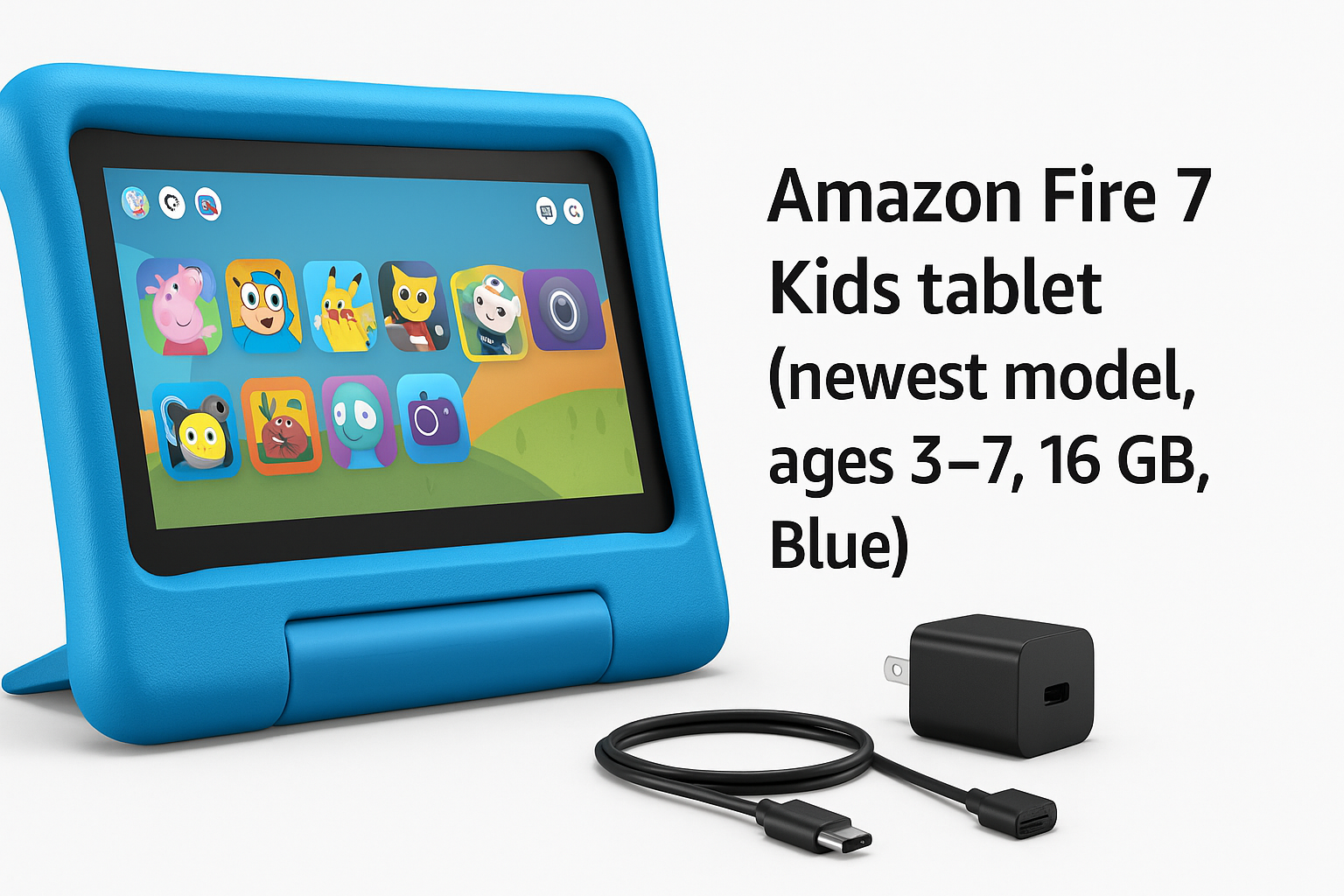
The Amazon Fire 7 Kids tablet (newest model) for ages 3–7 is a 7-inch Android‑based tablet wrapped in a thick, kid‑proof case and tuned specifically for young children. This Blue version includes:
- A 7" touchscreen display
- 16 GB of internal storage (expandable via microSD card)
- Up to 10 hours of mixed‑use battery life
- A durable, kid‑friendly case with an integrated stand
- A child‑focused interface with profiles and strong parental controls
- 6 months of ad‑free and exclusive content through Amazon’s children’s content service (Amazon Kids+)
It’s positioned as an all‑in‑one starter tablet for preschool and early‑elementary kids, designed primarily for streaming kids’ shows, reading picture books, and playing simple educational games. On Amazon, it’s currently offered at around $99.99, which puts it comfortably in the budget kids‑tablet category.
Why It Matters
Tablets are increasingly common in homes with small children, but handing a child an unrestricted adult device raises clear concerns:
- Exposure to inappropriate content
- Uncontrolled in‑app purchases
- Excessive or unsupervised screen time
- Fragility and breakage
The Fire 7 Kids tablet attempts to solve these problems by combining hardware that can survive drops with software that gives parents granular control over what kids can access and when. Because it’s tightly integrated into Amazon’s ecosystem, the device can feel almost turnkey: you charge it, set up child profiles, and a curated world of apps, books, and videos appears in a simplified interface.
For many families, especially those already using Prime Video or Kindle content, this integration and simplicity can matter more than having the fastest processor or highest‑resolution screen.
Key Advantages
1. Designed Specifically for Ages 3–7
The interface and hardware are tuned for very young users:
- Bright, grippy kid‑proof case: The thick blue bumper is easy for small hands to hold and helps absorb the drops and bumps that are inevitable with toddlers.
- Simple home screen: Large icons, simplified navigation, and dedicated child profiles make it easier for pre‑readers or early readers to tap what they want without wandering into system settings.
- Age‑appropriate content filters: Parents can set an age range (for example, 3–5 or 6–8) so that apps, books, and videos are automatically filtered to match developmental level.
2. Strong Parental Controls
The Fire 7 Kids tablet’s parental controls are one of its defining features:
- Individual child profiles: Create separate profiles for each child, each with its own content library, time limits, and restrictions.
- Screen time limits: Configure daily time caps and set educational goals, such as requiring a certain amount of reading or educational content before entertainment apps are available.
- Bedtime and downtime: Schedule when the tablet is usable; outside those windows, access is blocked without a parent PIN.
- Purchase and browsing control: Parents can disable app store purchases and web browsing or require explicit approval.
For parents who don’t want to wrestle with complex third‑party tools, these built‑in controls are a clear advantage.
3. Included Ad‑Free and Exclusive Content (6 Months)
The tablet includes 6 months of ad‑free and exclusive content from Amazon’s kids subscription service. Out of the box, that typically covers:
- Popular children’s shows and cartoons
- Storybooks and early readers
- Educational apps and simple learning games
- Character‑based content from well‑known kids’ brands
Because content is curated specifically for kids, parents can spend less time individually selecting apps and more time fine‑tuning access at a high level.
4. Solid Battery Life for a Kids’ Device
The Fire 7 Kids tablet is rated for up to 10 hours of battery life under typical use. In practice, that’s usually enough for:
- A full day of occasional use at home
- Long car rides or flights when downloaded content is used
For families who travel or rely on tablets to keep kids occupied on the go, this endurance is reassuring, especially in a budget device.
5. Good Value for What It Includes
When you factor in the kid‑proof case, the six‑month content subscription, and the integrated parental controls, the overall package offers strong value at roughly $99.99. Buying a standard tablet and then adding a rugged case, paid content, and parental control apps separately often costs more and requires more setup.
Key Limitations
1. Modest Performance and Display
The Fire 7 Kids tablet is built to be affordable rather than cutting edge. That means:
- Basic processor and RAM: Fine for streaming shows, reading, and simple games, but heavier apps can feel slow to launch and less responsive.
- Entry‑level 7" display: The screen is adequate for cartoons and picture books, but it’s not as sharp or bright as more expensive tablets. Viewing angles and outdoor visibility are only average.
If you’re looking for snappy performance or high‑resolution visuals, this model will likely feel limited.
2. Limited 16 GB Storage (Without microSD)
The tablet ships with 16 GB of internal storage, a portion of which is taken by the operating system and pre‑installed apps. This leaves a relatively small amount of free space for downloaded videos, apps, and offline books.
Real‑world implications:
- A handful of large apps or several downloaded seasons of shows can quickly fill the device.
- Families who travel frequently and rely on offline viewing will almost certainly want to add a microSD card.
Fortunately, the Fire 7 Kids supports expandable storage, but the card is not usually included, so consider it part of the effective cost if you plan heavy use.
3. Tightly Tied to Amazon’s Ecosystem
While the Amazon‑centric design simplifies setup, it also imposes boundaries:
- Amazon Appstore instead of Google Play: Some popular kids’ apps may be missing or appear later compared to Android tablets with Play Store access.
- Amazon account is required: Parents need an Amazon account to set up the device, manage profiles, and access content.
If you strongly prefer a more open, Google‑Play‑based experience, you may find these constraints frustrating.
4. Not Ideal for Older Kids or Heavy School Use
The Fire 7 Kids tablet is intentionally targeted at ages 3–7. Beyond that age range, limitations become more noticeable:
- Older children may find the screen small and the performance lacking for more complex games or productivity apps.
- School platforms, video calls, and typing longer assignments are better suited to larger, more powerful tablets or laptops.
For basic early‑learning apps and casual use, it works well; as a long‑term school device, it is less compelling.
Who It’s For
The Amazon Fire 7 Kids tablet is a strong fit for:
- Parents of toddlers and early‑elementary kids (3–7) who want a controlled, kid‑safe introduction to tablets.
- Families on a budget who still want a reputable brand, parental controls, and access to a robust kids’ content library at around $99.99.
- Households already invested in Amazon services, such as Prime Video, Kindle books, or other Fire tablets, who will benefit from familiar menus, account management, and content syncing.
- Caregivers, grandparents, and babysitters who want a simple, lockable device that can be handed to a child without constant supervision.
If your primary needs are streaming kids’ shows, storybooks, and simple educational games in a safe environment, this tablet checks the major boxes.
Who Should Skip It
You may want to consider alternatives if:
- You need a general‑purpose family tablet: Mixed child and adult use, productivity apps, and web browsing are better served by a higher‑end Android or iPad model.
- You rely heavily on Google Play apps or school platforms: Because the Fire 7 Kids uses Amazon’s Appstore and doesn’t ship with Google Play, certain classroom or niche apps might not be available.
- You expect console‑level gaming or very smooth performance: The entry‑level hardware is not designed for demanding 3D games or heavy multitasking.
- You dislike subscription ecosystems: While the included 6‑month content period is a perk, ongoing access to the full Amazon Kids+ catalog may require a paid subscription afterward.
If any of these points are priorities, a more powerful tablet or one that runs standard Android or iPadOS with Google Play or the App Store may be a better long‑term fit despite higher upfront cost.
Final Recommendation
The Amazon Fire 7 Kids tablet (newest model, ages 3–7, 16 GB, Blue) is a thoughtfully packaged starter tablet that focuses on what matters most for young children: safety, simplicity, and durability. Its combination of kid‑centric design, robust parental controls, and a curated library of ad‑free content makes it an appealing choice for parents who want to introduce screens in a controlled way.
However, its modest performance, basic display, and limited onboard storage mean it’s best viewed as an entry‑level, early‑childhood device, not a long‑term general‑purpose tablet. Paired with a microSD card and used primarily for kids’ shows, books, and learning apps, it represents solid value at approximately $99.99.
If your child is in the 3–7 age range and your priority is a safe, easy‑to‑manage environment rather than premium hardware, the Fire 7 Kids tablet is a sensible and budget‑friendly recommendation.