
Amazon Fire 7 Kids Tablet (Newest Model, Ages 3–7) Review: A Safe, Budget-Friendly First Tablet
Product Summary
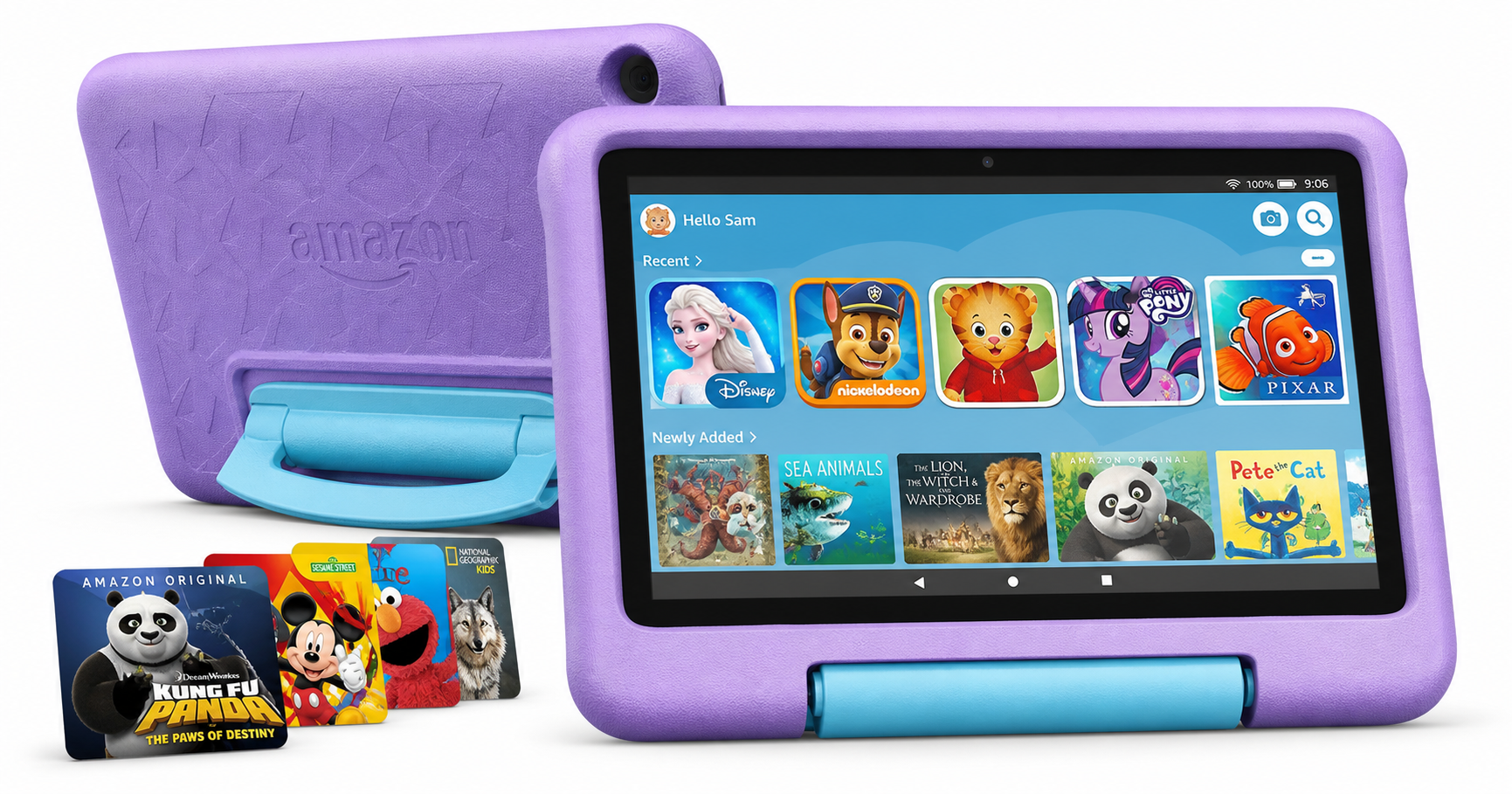
The Amazon Fire 7 Kids tablet (newest model), ages 3–7, 16 GB, Purple is Amazon’s smallest and most affordable kids’ tablet. Built around a 7‑inch display, it’s designed primarily for young children who are just getting started with apps, videos, audiobooks, and early learning content.
Key characteristics include:
- 7" display with a kid-friendly, chunky purple bumper case and built‑in stand
- 16 GB of internal storage, expandable via microSD card
- Up to 10 hours of mixed‑use battery life
- A full‑featured Fire OS tablet (not a toy), with a kid‑focused home screen
- Access to Amazon Kids+ content library (free for a limited period depending on bundle)
- Robust parental controls for screen time, content, and age filters
- 2‑year “worry‑free” guarantee in most regions, where Amazon will replace the device if it breaks under typical use
On Amazon, this model is typically positioned as a budget‑friendly kids tablet, often available around $54.99 depending on promotions, which makes it attractive for families who want a safe, controlled digital experience without paying premium‑tablet prices.
Target Users
This Fire 7 Kids tablet is best suited for:
- Children ages 3–7 who need a simple, durable device for educational apps, games, streaming kids’ shows, and reading picture books.
- Parents who prioritize safety and control over raw performance or high‑end hardware.
- Families on a budget who want a ready‑to‑go kids bundle (tablet + case + content + warranty) at a relatively low entry cost.
- Households already in the Amazon ecosystem (Prime Video, Kindle books, Audible, etc.), as these integrate smoothly into the Kids profiles with appropriate parental controls.
It’s less ideal for:
- Older kids (8+) who may find the screen small and performance limiting for more demanding games.
- Users who want broad access to the Google Play Store without sideloading workarounds.
- Parents who expect laptop‑like multitasking or high‑resolution, fast‑refresh displays.
Main Benefits
1. Kid‑Focused Design and Durability
The included kid‑proof case is a major part of the appeal. It’s thick, grippy, and designed to survive the usual drops and knocks that come with use by toddlers and early‑grade kids. The built‑in stand allows hands‑free viewing on a table or tray, helpful for car trips and mealtime video sessions.
Combined with the 2‑year worry‑free guarantee (where offered), the overall package significantly reduces anxiety around accidental damage.
2. Strong Parental Controls
Amazon’s parent dashboard and profiles are a standout feature:
- Set daily screen time limits and bedtimes.
- Create separate child profiles with age‑based content filters.
- Choose which apps, books, and videos each child can access.
- Restrict web browsing or enable a curated kids‑safe browser.
For busy parents, this means you can hand over the tablet with a reasonable level of confidence that your child won’t stumble into inappropriate content or in‑app purchases.
3. Curated Kids Content via Amazon Kids+
The tablet comes with a limited subscription period of Amazon Kids+, Amazon’s all‑in‑one kids content service. Depending on the region and bundle, this is often 6–12 months included, after which it renews as a paid subscription.
Within Amazon Kids+, children can access:
- Popular kids shows and cartoons
- Educational apps and games
- Age‑appropriate books and audiobooks
- Character‑themed content from well‑known brands (e.g., Disney, PBS Kids, and others in many markets)
The content library is curated and can be further filtered by age, which helps keep the experience safer and more tailored than a general‑purpose tablet.
4. Value‑Oriented Hardware
Hardware is modest but adequate for the target age group:
- 7" display suited to small hands
- 16 GB internal storage for a selection of apps and offline media
- microSD slot to expand storage for downloaded content
- Up to 10 hours of battery life under typical kids’ usage (video, lightweight games, e‑books)
For basic preschool and early‑elementary needs—ABC games, basic math apps, offline episodes of cartoons—the device generally keeps up, even if loading times aren’t instant.
Key Considerations
Before buying, there are a few important trade‑offs to be aware of:
1. Limited Storage (16 GB)
While 16 GB sounds adequate, the operating system and preinstalled apps take a significant portion of that, leaving far less for new apps and downloads. Parents often report tablets filling up faster than expected once several games and offline videos are installed.
You can mitigate this by:
- Adding a microSD card and configuring it for content storage.
- Regularly deleting unused apps and clearing downloads.
- Being selective about which shows and games are available offline.
Still, if multiple kids share a single device or if you want a large library of offline videos, the storage limit will become noticeable.
2. Entry‑Level Performance
The Fire 7 Kids uses a budget‑class processor and modest RAM:
- Basic games and educational apps run fine, but more demanding games can be sluggish.
- App loading times are typically longer than on mid‑range Android tablets or iPads.
- Multitasking is limited; switching between several apps can feel slow.
For the 3–7 age range, this is usually acceptable, but parents looking for very smooth performance or future‑proofing for older kids may want to consider a more powerful model.
3. Screen Quality and Size
The 7‑inch panel is compact and easy for small hands to hold, but:
- Resolution and brightness are serviceable rather than impressive.
- Viewing angles and color are adequate for cartoons and kids’ apps but not particularly sharp for detailed comics or text.
If your child watches a lot of video content or you often share the screen together, a larger or higher‑resolution display (such as on an 8‑ or 10‑inch kids tablet) may be more comfortable.
4. Amazon‑Centric Ecosystem
The Fire 7 Kids runs Fire OS, Amazon’s Android‑based system:
- The experience is tightly integrated with Amazon services (Prime Video, Kindle, Audible, Amazon Kids+).
- The default app store is the Amazon Appstore, not Google Play.
This ecosystem works very well if you already use Amazon services, but the app selection is narrower than on full Google Play. There are workarounds for advanced users, but they’re not officially supported and may not be appropriate on a managed kids’ device.
Pros
- Kid‑ready bundle: Includes rugged purple case with stand, kids content, and extensive parental controls out of the box.
- Excellent safety and control features: Easy setup of child profiles, time limits, and content filters.
- Good value at around $54.99 for a complete kids tablet package.
- Long battery life (up to 10 hours) for typical kids use.
- microSD expansion to increase space for downloads and offline media.
- 2‑year worry‑free guarantee in supported regions adds peace of mind against accidental damage.
- Compact and lightweight for small hands and portable use in cars, on trips, or at grandparents’ houses.
Cons
- 16 GB internal storage fills quickly with apps and downloaded videos; microSD card is strongly recommended.
- Entry‑level performance can feel slow with heavier apps or when switching between multiple tasks.
- Screen quality is basic, with modest resolution and brightness compared to higher‑end tablets.
- Amazon‑centric app ecosystem limits access to certain Android apps unless you use unofficial workarounds.
- Kids+ subscription renews after the included period, adding an ongoing cost if you want to keep the full content library.
Alternatives
If you’re considering the Amazon Fire 7 Kids but aren’t sure it’s the right fit, here are common alternative paths (without naming specific competing brands or linking alternate URLs):
-
Larger‑Screen Kids Tablets (8" or 10")
Better suited for:- Shared viewing (parent + child together)
- Older kids who benefit from more workspace and higher resolution
- More immersive video and reading experiences
Trade‑offs: Higher price, larger and heavier to hold, but generally faster hardware.
-
Standard Fire Tablets with a Separate Case
Parents comfortable configuring parental controls manually sometimes choose a regular Fire tablet and add a rugged case. This can provide:- More configuration flexibility
- Potentially better specs or more storage for a similar or slightly higher cost
However, you won’t get the same 2‑year worry‑free replacement policy or the simplified kid‑centric experience out of the box.
-
Non‑Amazon Android or iOS Tablets
Mid‑range Android tablets or iPads can offer:- Faster processors and more RAM
- Higher‑quality displays
- Full access to Google Play or the App Store
These options, however, are usually significantly more expensive than the Fire 7 Kids and may require more manual setup to match Amazon’s level of built‑in parental controls and curated content.
Conclusion
The Amazon Fire 7 Kids tablet (newest model), ages 3–7, 16 GB, Purple is a well‑thought‑out starter tablet for young children. It prioritizes safety, durability, and value over raw performance or premium hardware, bundling parental controls, curated kids content, and a sturdy case into one straightforward package.
If your primary goals are to keep your child entertained and engaged with age‑appropriate apps and media, while maintaining strong control over what they see and for how long, this tablet delivers a lot for its price point of roughly $54.99. Adding a microSD card for extra storage and being realistic about performance and screen quality will help ensure a smoother long‑term experience.
Parents seeking a first device for toddlers and early elementary kids, especially those already using Amazon services, will likely find the Fire 7 Kids tablet a practical, budget‑friendly choice. Those who need more storage, a larger or sharper display, or faster performance should consider stepping up to a larger kids tablet or a more powerful general‑purpose tablet with a child‑friendly setup.