
Anker 552 USB-C Hub (9-in-1): Compact Connectivity for Modern Laptops
Introduction
Thin and light laptops often sacrifice ports in favor of portability, leaving users dependent on external hubs for everyday connectivity. The Anker 552 USB-C Hub (9-in-1) is designed to solve this problem by turning a single USB-C port into a compact workstation, adding video output, extra USB ports, card readers, and power delivery in one small device. Positioned as a mid-range hub at around $28.78, it aims to strike a balance between functionality, build quality, and portability.
Product overview and key features
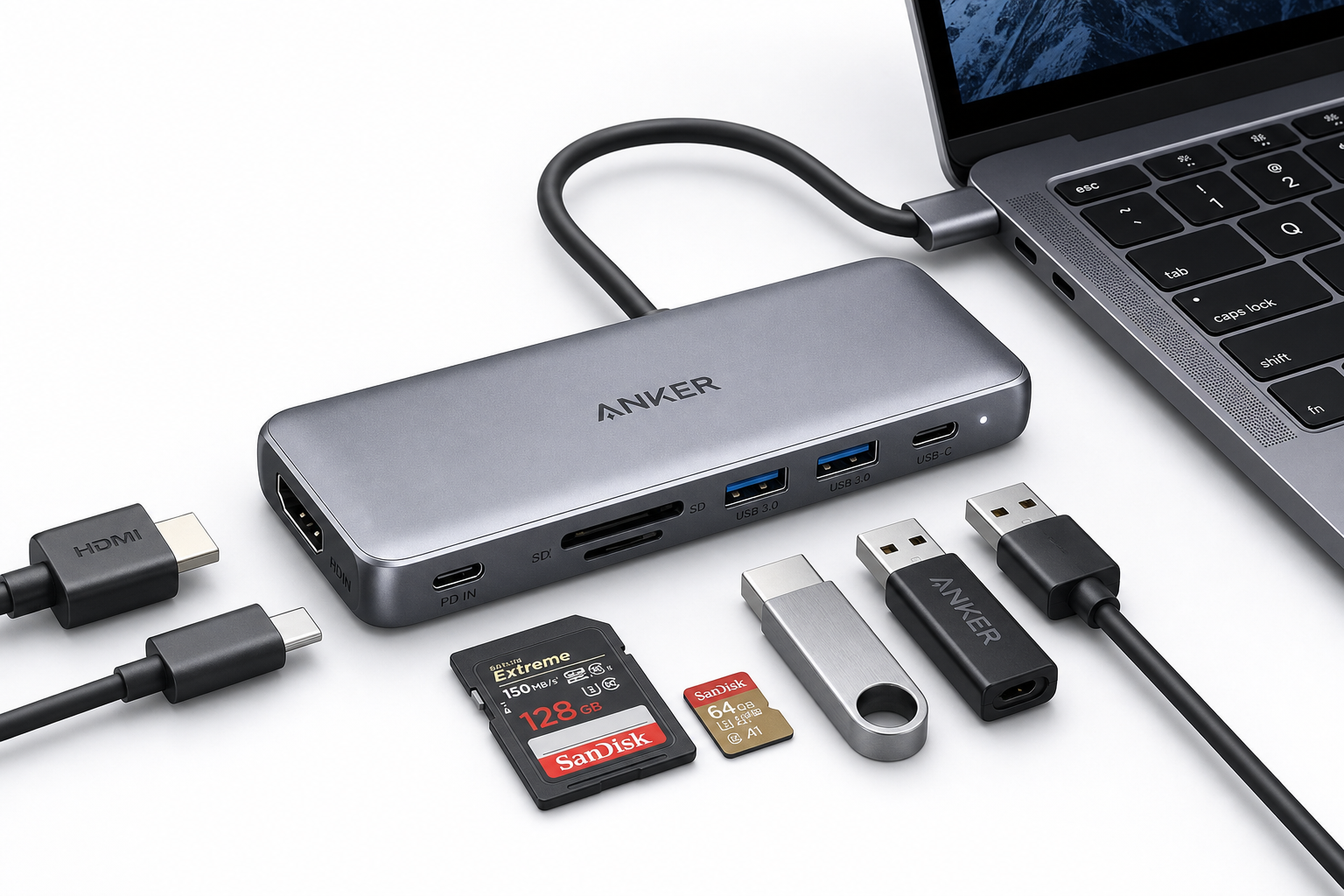
The Anker 552 is a 9-in-1 USB-C hub that connects to your host device via an attached USB-C cable. It is primarily intended for USB-C laptops and tablets that support DisplayPort Alt Mode and USB-C power delivery.
Key features and ports
- Video output
- 1 × HDMI port supporting up to 4K output (typically 30 Hz at 4K, or 60 Hz at 1080p, depending on host capabilities)
- Data ports
- Multiple USB-A ports (commonly USB 3.0 / 3.2 Gen 1) for connecting peripherals such as mice, keyboards, external drives, and USB flash drives
- At least one USB-C data port for newer accessories and storage devices
- Storage and media
- Full-size SD card reader
- microSD card reader
- Designed for photographers, content creators, and anyone who frequently transfers media from cameras or drones
- Power Delivery (PD) passthrough
- A dedicated USB-C PD input port that allows you to connect your laptop charger to the hub and power your laptop through a single cable (exact wattage support depends on the model and host device)
- Design and build
- Compact, travel-friendly form factor that fits easily into a laptop bag
- Aluminum or aluminum-accented housing to improve durability and heat dissipation
- Integrated, fixed USB-C cable to avoid carrying extra leads
Overall, the Anker 552 is meant to serve as a versatile all-in-one hub for common workflows: connecting an external monitor, a few USB peripherals, and memory cards, while still charging your laptop.
Performance and user experience
Setup and compatibility
Setup is essentially plug-and-play. On most modern Windows, macOS, and ChromeOS laptops with a compatible USB-C port, the hub is automatically recognized without additional drivers. The HDMI port appears as a standard external display, and the SD/microSD readers show up as removable storage.
Key compatibility points:
- Works best with laptops that support USB-C DisplayPort Alt Mode and USB-C Power Delivery
- Often compatible with popular devices such as MacBook Air/Pro, many Windows ultrabooks, and some USB-C tablets
- Functionality may be limited on phones, older USB-C devices, or systems that provide only data over USB-C without display output
Display and connectivity
The HDMI output generally delivers a stable signal at 1080p and up to 4K, making it suitable for productivity tasks, streaming, and general office use. For users who require very smooth motion (e.g., competitive gaming at high frame rates), the 4K@30 Hz limitation on many similar hubs may feel restrictive, but for typical work and entertainment scenarios it is adequate.
USB-A and USB-C data ports perform reliably for everyday peripherals:
- Keyboards and mice experience minimal latency
- External SSDs and HDDs typically reach speeds in line with USB 3.0/3.2 Gen 1 when not heavily sharing bandwidth with other devices
- Multiple low-bandwidth devices (e.g., keyboard, mouse, USB headset, flash drive) can run simultaneously without issues in normal use
Storage and file transfers
The integrated SD and microSD card readers are a strong convenience factor for photographers, videographers, and users of action cameras and drones. Transfer speeds are generally appropriate for UHS-I cards and everyday media workloads like moving photo libraries or 1080p/4K footage to your laptop.
Using the SD and microSD slots in parallel (when supported) allows you to move files between different cards and your computer without needing separate card readers. This reduces desk clutter and cable management overhead.
Power delivery and thermal behavior
With USB-C PD passthrough, the Anker 552 lets you connect one power adapter to the hub and keep your laptop charged while using peripherals. Provided your charger supplies sufficient wattage and your laptop supports USB-C charging, this can simplify your setup, especially when working on the go.
As with most compact hubs, some heat buildup is normal under sustained load (for example, when driving a 4K display and transferring large files simultaneously). The metal body is designed to help dissipate this heat. In general, the device becomes warm to the touch but stays within typical operating expectations as long as it is used in a well-ventilated area.
Everyday usability
From a user-experience standpoint, the Anker 552 focuses on straightforward reliability:
- The single-cable connection to the laptop reduces cable clutter and makes it easy to dock or undock quickly
- The port layout is generally thoughtful, with HDMI and power on one side and frequently accessed ports (USB, card readers) on others, helping avoid cable congestion
- The compact size and light weight make it practical for everyday commuting or travel, especially compared to bulkier docking stations
Many users will find that it comfortably covers common daily needs: attaching a monitor, USB peripherals, wired input devices, and occasionally reading from SD cards—all while charging the laptop through the same hub.
Pros and cons
Pros
- Versatile 9-in-1 design with HDMI, multiple USB ports, SD/microSD card readers, and USB-C PD passthrough in a single unit
- Compact and travel-friendly form factor that complements thin-and-light laptops
- Plug-and-play on major operating systems, with no extra software required for most setups
- Integrated SD and microSD readers eliminate the need for separate card reader accessories
- Single-cable workflow to connect display, power, and peripherals through one USB-C connection
- Backed by Anker’s reputation for consumer electronics accessories and hubs
Cons
- HDMI output on many laptops will be limited to 4K at 30 Hz, which is less ideal for high-frame-rate gaming or very smooth cursor movement on large displays
- Overall bandwidth is shared across all connected devices, so simultaneous heavy data transfers on multiple ports can reduce speeds
- The fixed USB-C cable cannot be replaced if damaged and offers less flexibility than a detachable cable design
- Requires a fully featured USB-C port (with DisplayPort Alt Mode and PD) for full functionality; not all USB-C ports on older or budget devices meet this requirement
- Not a full enterprise dock—lacks extras such as Ethernet, multiple video outputs, or dedicated audio jacks
Conclusion and recommendation
The Anker 552 USB-C Hub (9-in-1) is a well-rounded, portable connectivity solution aimed at users who need more ports than their modern laptop provides but do not want to invest in a large desktop dock. With HDMI output, multiple USB ports, card readers, and power delivery passthrough, it covers the essentials for students, remote workers, and frequent travelers.
Its main trade-offs involve the usual limitations of single-cable USB-C hubs: shared bandwidth among devices, a 4K@30 Hz cap on many setups, and reliance on a fully featured USB-C port. For users who require dual 4K displays, wired networking, or advanced docking features, a higher-end docking station may be more appropriate.
For most everyday productivity tasks—web browsing, office work, video streaming, and routine media transfers—the Anker 552 offers a solid blend of functionality and portability at around $28.78. If you are looking for a compact, reliable hub to expand your laptop’s connectivity without significantly increasing bulk, the Anker 552 USB-C Hub (9-in-1) is a strong candidate to consider.