
Apple 2026 MacBook Air 13-inch (M5) Review: A Thin-and-Light Laptop Built for Everyday AI Workflows
Introduction
The Apple 2026 MacBook Air 13-inch Laptop with M5 chip is Apple’s next iteration of its most popular notebook, aimed at students, professionals, and everyday users who want a thin‑and‑light machine that can also handle modern, AI‑assisted workloads. This specific configuration includes a 13.6‑inch Liquid Retina display, 16GB of unified memory, a 512GB SSD, a 12MP Center Stage camera, Touch ID, Wi‑Fi 7 support, and comes in the Midnight finish.
Positioned as the mainstream portable Mac, this MacBook Air focuses on silent operation, long battery life, and solid performance for productivity, light creative work, and on‑device AI features, all at around $1234.00 on Apple’s preferred online marketplace.
Setup / Getting Started
Getting started with the 2026 MacBook Air 13-inch is straightforward, especially if you’re already in the Apple ecosystem.
-
Unboxing and first impressions
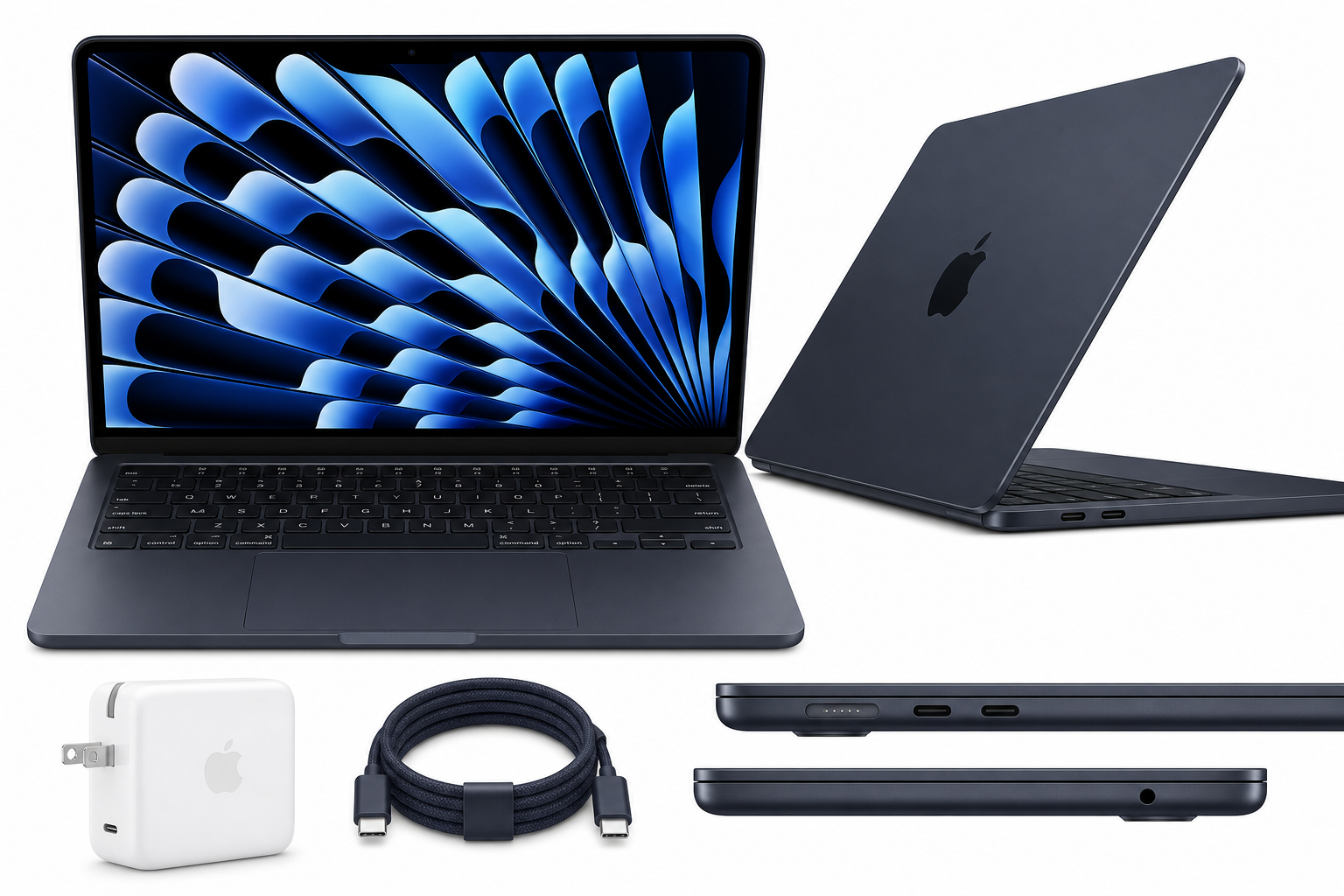
The laptop arrives in minimalist, protective packaging. The box typically includes:- The 13‑inch MacBook Air with M5 chip in Midnight
- A USB‑C power adapter
- A color‑matched USB‑C charging cable
The notebook feels very light and slim, with the characteristic wedge-less, uniform profile Apple has used in recent generations.
-
Initial power‑on and macOS setup
On first boot, you’re guided through Apple’s setup assistant:- Language, region, and Wi‑Fi selection (now taking advantage of Wi‑Fi 7 routers where available)
- Sign‑in with an Apple ID to sync iCloud data, photos, and notes
- Optionally restoring from another Mac, Time Machine, or iCloud backup
- Setting up Touch ID for secure logins and Apple Pay
-
Configuring for AI‑centric workflows
Given that the M5 chip is “built for AI,” it’s worth enabling and configuring:- On‑device dictation and voice control
- Live captions and accessibility enhancements
- Photo and video analysis features (face recognition, object tagging)
- Any third‑party AI apps or local models you plan to use for coding assistance, document summarization, or creative tools
With 16GB of unified memory and a 512GB SSD, the base environment feels responsive right out of the box, even once you’ve installed core productivity suites and a few heavier creative apps.
Daily Usage
In everyday use, the 2026 MacBook Air 13-inch is built around three pillars: portability, visual quality, and quiet efficiency.
Portability and ergonomics
The 13‑inch form factor remains a great balance of screen real estate and mobility. The chassis is thin and light enough to carry in a small backpack or tote, and the flat design makes it easy to slide into a sleeve.
- Keyboard: The backlit Magic Keyboard remains comfortable for long typing sessions, with stable keys and a precise feel.
- Trackpad: Apple’s large Force Touch trackpad continues to be one of the best on any laptop, with accurate tracking and smooth gesture support.
- Biometrics: Touch ID is integrated into the power button, making logins, password autofill, and purchases fast and secure.
Display and media consumption
The 13.6‑inch Liquid Retina display is one of the standout features:
- High resolution and sharp text, ideal for reading and editing documents
- Wide color gamut and strong brightness for photo viewing and media consumption
- Thin bezels that help keep the footprint small while maximizing usable screen space
For streaming video, the combination of the vibrant display and surprisingly full speakers for such a thin laptop make watching movies, video calls, and online lectures a pleasant experience.
Connectivity and accessories
Wi‑Fi 7 support future‑proofs the MacBook Air for the next generation of wireless networking, offering higher throughput and improved stability when paired with compatible routers. Bluetooth connects easily to mice, keyboards, headphones, and other peripherals.
With only a limited number of USB‑C/Thunderbolt ports (typical for the Air line), many users will want a small hub or dock to easily attach storage, displays, or wired networks.
Performance & Reliability
The M5 chip is the centerpiece of this 2026 MacBook Air, designed to balance performance and power efficiency with a particular emphasis on on‑device AI tasks.
General performance
For everyday activities—web browsing, office apps, note‑taking, email, and streaming—the MacBook Air M5 handles everything smoothly and silently. The 16GB of unified memory helps keep multiple apps and browser tabs open without frequent reloading, and the 512GB SSD offers quick boot times and fast file access.
More demanding workflows, such as light video editing, photo batch processing, and software development, are well within the capabilities of this configuration. While it’s not intended to replace a high‑end MacBook Pro for heavy 4K video or large 3D projects, the Air holds its own for most semi‑pro workloads.
AI‑related tasks
The “Built for AI” positioning mainly shows up in:
- Faster on‑device photo and video analysis (face/object detection, background blur, and enhancement)
- Snappier experiences with voice dictation, live transcription, and language tools
- Improved responsiveness for AI‑assisted features in supported creative and productivity apps
These tasks benefit from the M5’s updated neural processing capabilities, and the fanless design means even AI workloads remain quiet, though very heavy sustained tasks may lead to modest thermal throttling over extended periods.
Battery life and thermals
Under mixed productivity (browsing, document editing, streaming, and communication apps), the MacBook Air continues Apple’s tradition of strong battery life. While exact runtime depends on usage, the machine is generally well‑suited to a full work or school day away from the charger.
Thermally, the Air remains cool and comfortable on the lap in light to moderate tasks. Under sustained heavy loads like long exports or continuous compilation, the chassis can get warm but not uncomfortably so, and the absence of a fan means operation is always silent.
Reliability and stability
macOS on Apple silicon has matured over several generations, and the combination of Apple‑designed hardware and software generally leads to strong stability. For typical users, crashes and glitches are infrequent, and sleep/wake behavior is fast and reliable.
What Works Well
- Performance for the size: The M5 chip provides ample power for productivity, light creative work, and AI‑assisted tasks without needing a thicker, heavier chassis.
- Excellent 13.6‑inch Liquid Retina display: Sharp, bright, and color‑accurate enough for most creative and professional needs in a compact frame.
- 16GB unified memory standard in this configuration: Reduces slowdowns when multitasking or working with larger files.
- Quiet, fanless design: Completely silent operation is a major advantage in classrooms, offices, and libraries.
- Wi‑Fi 7 support: Offers better future‑proofing and potential speed improvements over older wireless standards.
- 12MP Center Stage camera: Provides clearer video calls and keeps you framed automatically as you move, improving conferencing quality.
- Strong integration with Apple ecosystem: Features like Handoff, AirDrop, and Universal Clipboard make this MacBook Air a natural fit if you use an iPhone or iPad.
What Could Be Improved
- Limited port selection: As with previous Air models, the restricted number and type of ports means many users will need to buy a separate hub or dock for accessories and external displays.
- Not ideal for very heavy pro workloads: While capable, the Air’s thin, fanless design isn’t targeted at users who regularly edit long 4K video projects or run intensive 3D or scientific simulations—those users are better served by a MacBook Pro.
- Base storage can be restrictive for large local datasets: Even at 512GB, users working extensively with large media libraries, AI model files, or local datasets may find themselves reaching for external storage sooner than they’d like.
- Midnight finish can show smudges: The Midnight colorway looks premium, but is more prone to visible fingerprints and smudges compared with lighter finishes.
- Price vs. entry‑level laptops: Positioned at around $1234.00, the MacBook Air is significantly more expensive than many entry‑level Windows ultrabooks and Chromebooks, even though it offers better build quality and performance.
Overall Impression
The Apple 2026 MacBook Air 13-inch with M5 chip refines what has long made the Air so popular: a great display, strong performance within a slim and silent chassis, and deep integration with Apple’s software and services. The move to the M5 chip and Wi‑Fi 7 pushes the platform forward, particularly for users who increasingly rely on AI‑assisted workflows but still value portability and battery life over raw, sustained compute power.
For students, remote workers, and general users who want a light, quiet Mac that can comfortably handle productivity, content consumption, and moderate creative tasks—with growing headroom for on‑device AI—the 2026 MacBook Air 13-inch stands out as a compelling choice. If you prioritize more ports or need workstation‑class performance, a MacBook Pro may be the better option, but for most users, this Air hits a strong balance of capability, portability, and long‑term usability.
You can check current availability and configuration details for this model on its product page: https://www.amazon.com/dp/B0GR1JTFP8.