
Apple iPad 11‑inch (A16, 128GB, Wi‑Fi): A Balanced Upgrade for Everyday Use
Product Context
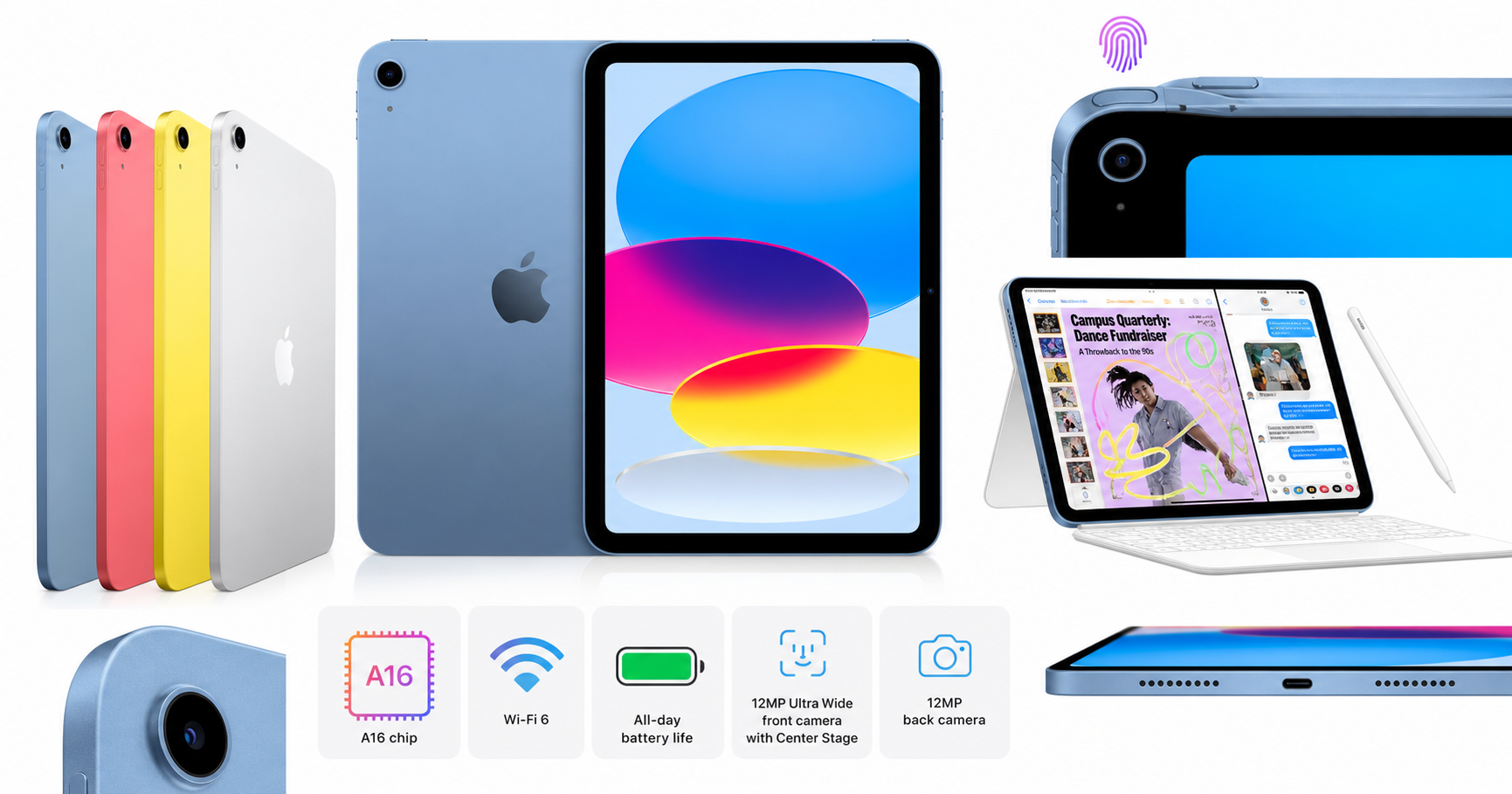
The Apple iPad 11‑inch (A16 chip, 128GB, Wi‑Fi, Blue) sits in Apple’s mid‑tier tablet segment. It is designed for users who need more power than older base‑model iPads but do not require the high refresh rate display, extra GPU power, or accessory ecosystem of the iPad Pro line.
Key positioning points:
- Chipset: Apple A16, a fast 6‑core CPU and 5‑core GPU architecture that has already proven capable in recent iPhones.
- Display: 11‑inch Liquid Retina panel with wide color and good brightness, tuned for media consumption, web, and productivity.
- Storage and connectivity: 128GB internal storage and Wi‑Fi 6, aimed at mainstream usage rather than heavy local media libraries.
- Design: Slim aluminum body, available in several colors, with this configuration in Blue.
- Biometrics and ports: Touch ID embedded in the top button and USB‑C charging/data port.
Overall, this model is meant to be a general‑purpose tablet for students, families, and professionals who rely on web apps, video calls, note‑taking, and light content creation.
Note on pricing: At the time of writing, this configuration is commonly listed around $399.99 on Amazon, which places it between Apple’s entry‑level iPad and the 11‑inch iPad Pro in the current lineup.
Feature Breakdown
Design and Build
- Form factor: Around 9.79 x 7.07 x 0.28 inches and roughly 1.05 lb, it’s close to the long‑standing 11‑inch iPad footprint. The weight is light enough for one‑handed reading but feels substantial and rigid.
- Materials: Aluminum chassis with a flat‑edge design that matches the broader modern iPad aesthetic.
- Color: The Blue finish adds a subtle color accent without being overly bright.
Display
- Panel: 11‑inch Liquid Retina (IPS) display.
- Color: Wide color (P3) support and good factory calibration make it suitable for photo viewing, casual editing, and video streaming.
- Resolution and clarity: Text and icons appear crisp for reading and productivity. Viewing angles are wide, and reflections are reasonably controlled for an IPS panel.
While it lacks some of the advanced features of Apple’s Pro displays (such as ProMotion high refresh rate and mini‑LED backlighting), it offers a strong balance for mainstream entertainment and work.
Processor and Storage
- A16 chip: The A16 platform provides more than enough power for:
- Web browsing with many tabs
- Streaming HD and 4K video
- Office and education apps
- Casual to moderately demanding games
- Photo editing and light video editing in apps like iMovie or CapCut
- 128GB storage: Sufficient for users who primarily stream content and rely on cloud storage, but power users storing large offline video libraries or numerous large apps may prefer higher capacities.
Connectivity and Ports
- Wi‑Fi 6: Offers solid wireless performance and better throughput compared with older Wi‑Fi standards, particularly in congested environments like apartments or campus housing.
- USB‑C: Replaces the older Lightning connector, allowing easier connection to modern accessories, docks, displays, and universal chargers.
Cameras and Audio
- 12MP front camera: Ultra‑wide front camera is positioned to support video calls and conferencing. Center framing features in supported apps help keep you in view during calls.
- 12MP rear camera: Adequate for document scanning, occasional photos or videos, and AR apps. It’s not a replacement for a dedicated smartphone camera, but it is serviceable.
- Speakers: Stereo speaker setup delivers clear sound for videos and casual music listening, though not on the level of the Pro line’s more expansive soundstage.
Security and Biometrics
- Touch ID: Integrated in the top button. It is fast and accurate for unlocking, approving App Store purchases, and using password managers. Face ID is not present, which some users may miss, but Touch ID remains reliable and familiar.
Performance Insights
Everyday Use
In typical daily tasks—web browsing, email, document editing, messaging, and streaming—the A16 chip keeps the interface smooth and responsive. App switching is snappy, and multitasking features such as Split View and Slide Over feel fluid.
This model is particularly well‑suited to:
- Students who need to juggle note‑taking, research, and video lectures
- Professionals using web‑based dashboards, email, and document workflows
- Families using shared profiles for media consumption and casual apps
Creative and Productivity Work
- Photo and graphics apps run comfortably, benefiting from the A16’s GPU. Light to moderate workloads—like editing a series of photos, sketching, or annotating PDFs—are well within its capabilities.
- Video editing at 1080p is generally smooth in consumer‑level apps. Simple 4K edits or short social‑media videos are possible, though continuous, heavy editing is better suited to higher‑end iPads or Macs.
For users who rely heavily on Apple Pencil and keyboard accessories, this iPad can function as a part‑time laptop replacement, depending on app needs and personal workflow.
Gaming
The A16 GPU supports modern mobile games with high graphics settings at smooth frame rates in most titles. Games that are well‑optimized for iPadOS benefit from the larger screen, though the 60Hz display caps the perception of ultra‑high frame rate responsiveness compared with ProMotion panels.
Battery Life
Apple targets “all‑day battery life,” and in mixed use (web, video, productivity apps), this is realistic for many users. Streaming or gaming continuously will shorten runtime but still falls within expected norms for an 11‑inch tablet. Overnight standby drain is modest, so it can be left unplugged without large battery losses.
Usability
Setup and Software
- Initial setup: Guided iOS‑style onboarding, with quick transfer from an existing iPhone or iPad if you’re already in Apple’s ecosystem.
- App ecosystem: Access to the full range of iPadOS apps, including mainstream productivity tools, education apps, and creative software.
- Updates: iPadOS updates typically extend support for several years, making this device a longer‑term investment for most households.
Input and Accessories
- Touch interaction: Multi‑touch gestures are responsive, with smooth scrolling and precise tap targets.
- Apple Pencil (sold separately): Ideal for handwriting, drawing, annotation, and design work. Latency and tracking feel natural for note‑taking and sketching.
- Keyboards and cases (sold separately): When paired with a compatible keyboard case, the iPad can handle writing, email, and document editing without a separate laptop for many tasks.
Portability and Ergonomics
- Weight and thickness: Easy to slip into a backpack or handbag and comfortable to hold in one or two hands for reading.
- Landscape and portrait use: The size is well‑balanced for both orientations—useful for reading, web browsing, and media viewing.
Learning Curve
- Existing Apple users will find the interface immediately familiar.
- New users transitioning from other platforms will encounter a shallow learning curve thanks to intuitive gestures and consistent UI patterns.
Trade-offs
While the 11‑inch A16 iPad is versatile, there are clear trade‑offs to consider:
Compared With Cheaper iPads
Pros:
- Noticeably faster chip for heavier multitasking and gaming
- Better display quality and color accuracy
- More modern design and connection options (USB‑C, Wi‑Fi 6)
Cons:
- Higher cost than older or entry‑level models, even when discounted to around $399.99
- 128GB base storage can still feel limiting if you store a lot of offline video and large apps
Compared With iPad Pro
Pros:
- More affordable entry point to an 11‑inch tablet form factor
- Similar software experience for most mainstream apps
Cons:
- Lacks Pro features such as ProMotion high‑refresh display and more advanced camera system
- Less overhead for very demanding creative or professional workflows
Other Considerations
- No Face ID: Some users may prefer facial recognition over Touch ID, particularly when the iPad is mounted or used at a distance.
- Single port: With only one USB‑C port, external accessories may require a hub if you need to connect multiple devices simultaneously.
Conclusion
The Apple iPad 11‑inch with A16 chip, 128GB storage, Wi‑Fi 6, and all‑day battery life is a well‑rounded tablet that hits a strong middle ground between price, performance, and features. It is ideal for:
- Students who want a primary study and entertainment device
- Professionals who need a capable secondary screen or travel‑friendly productivity tool
- Home users seeking a long‑lasting tablet for browsing, streaming, and casual creative work
If you need the very best display and maximum performance for intensive creative or professional apps, the iPad Pro lineup still holds an advantage. Conversely, if your needs are basic and budget is tight, an older or entry‑level iPad may suffice. But for many people who want a modern Apple tablet with a bright 11‑inch display, fast A16 chip, good cameras, and broad accessory support, this model represents a compelling balance—especially when it can be found around $399.99 on Amazon.
For more details or to check the latest availability, see the product page on Amazon: https://www.amazon.com/dp/B0DZ75TN5F.