
Apple iPad 9th Generation (2021) Renewed Review: Still the Best Value iPad for Everyday Use?
Overview
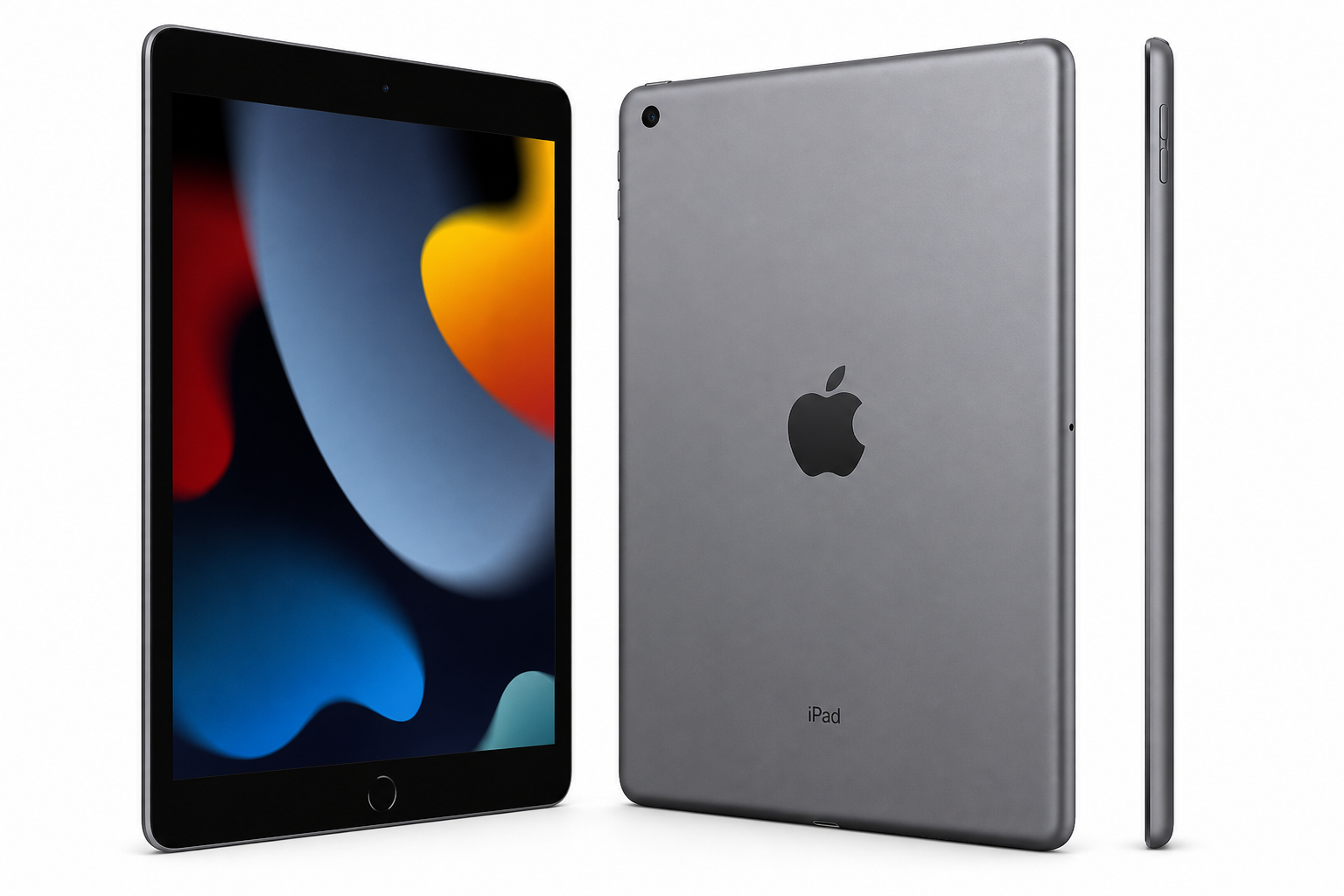
The Apple iPad (9th Generation, 10.2‑inch, 2021), 64GB, Wi‑Fi, Space Gray (Renewed) aims to deliver the core iPad experience at a lower cost than buying new. Released originally in 2021, the 9th‑gen iPad is built around Apple’s A13 Bionic chip and a 10.2‑inch Retina display, with support for the 1st‑generation Apple Pencil and Smart Keyboard. This renewed version is a refurbished unit that has been inspected, cleaned, and tested to work like a fully functional iPad, typically with cosmetic signs of prior use.
If you are looking for a reliable tablet for browsing, streaming, schoolwork, and casual productivity without paying for Apple’s latest hardware, this renewed model remains one of the more compelling budget‑friendly iPads. Depending on current offers, it is often available around $178.00 on Amazon, which is significantly below the price of a brand‑new unit while keeping the same core feature set.
Key Highlights
- 10.2‑inch Retina display with good brightness and color for media, reading, and web use.
- A13 Bionic chip, still capable for everyday apps, multitasking, and light gaming.
- 64GB of storage, enough for typical use if you stream media rather than store everything offline.
- Touch ID Home button, familiar design and secure biometric authentication.
- Apple Pencil (1st gen) and Smart Keyboard support, extending it for note‑taking and light productivity.
- Renewed/refurbished condition, offering cost savings over a new iPad while promising full functionality.
Core Features
Design and Build
The 9th‑gen iPad keeps Apple’s classic tablet design: aluminum body, relatively thick bezels, and a physical Home button with Touch ID at the bottom. The Space Gray finish remains understated and professional. While newer iPads have moved to slimmer bezels and USB‑C, this model’s familiar layout can actually be an advantage for users who prefer the Home button and don’t mind a more traditional look.
Even in renewed condition, you should expect:
- A sturdy aluminum chassis with no structural compromises.
- Possible minor cosmetic imperfections (small scratches or marks), depending on the refurbisher’s grading, but no impact on function.
Display
The 10.2‑inch Retina display (2160 × 1620 resolution) remains one of the main reasons the 9th‑gen iPad still feels modern enough for everyday tasks:
- Sharp text and images for reading, web browsing, and productivity apps.
- Good color reproduction for streaming video and casual photo editing.
- True Tone support (on the 9th generation), which adjusts white balance to match ambient lighting, making long reading sessions more comfortable.
You do not get the fully laminated display or wide color gamut of higher‑end iPads, so reflections are more noticeable and contrast is slightly lower. However, for the price segment this device targets, the screen is more than adequate.
Performance (A13 Bionic)
The A13 Bionic chip, originally used in the iPhone 11 line, is still very capable for mainstream tablet use:
- Smooth operation in web browsing, social apps, streaming, notes, and productivity tools.
- Support for Apple Arcade and many popular games at medium to high settings.
- Enough headroom for basic multitasking, like Split View (two apps side by side) plus a floating video.
You may encounter some slowdowns in:
- Very heavy multitasking scenarios.
- Professional‑grade creative apps (e.g., large multi‑layer art or complex video editing projects).
That said, for its intended audience—students, families, and casual users—the A13 still provides a noticeably better experience than many budget Android tablets in this price band.
Storage (64GB)
The 64GB capacity is a practical baseline for a general‑purpose tablet, especially if you:
- Stream most of your video and music.
- Use cloud storage (iCloud, Google Drive, Dropbox) for documents and photos.
It can feel tight if you:
- Store large photo or video libraries locally.
- Download many large games or offline Netflix/Prime Video content at once.
Since there is no microSD expansion, it is worth periodically offloading older content to the cloud or a computer to keep performance snappy.
Battery Life
The 9th‑gen iPad is rated for around 10 hours of typical use (web, video, or light productivity) on Wi‑Fi. Renewed units depend slightly on refurbishing quality, but reputable refurbishers typically ensure that the battery remains within a healthy range or replace it if necessary.
In day‑to‑day use, you can generally expect:
- A full day of classes or office work with mixed usage.
- Multiple days of light, occasional use (checking email, browsing, streaming an hour or two a day).
Connectivity and Accessories
Key connectivity and accessory support includes:
- Wi‑Fi (dual‑band 802.11ac) and Bluetooth for connecting keyboards, headphones, and other peripherals.
- Lightning port for charging and data transfer, compatible with existing Lightning accessories and chargers.
- Smart Connector for Apple’s Smart Keyboard and some third‑party keyboard cases.
- Apple Pencil (1st generation) support for handwriting, annotation, and sketching.
The presence of the Lightning port instead of USB‑C is a drawback if you want to standardize chargers and accessories across newer Apple devices, but can be an advantage if you already own Lightning‑based gear.
Usage Experience
Everyday Use
For typical home and school tasks, the renewed 9th‑gen iPad feels responsive and reliable:
- Web browsing in Safari or Chrome is smooth with multiple tabs.
- Streaming via YouTube, Netflix, Disney+, and similar services works well, with the display and speakers providing a pleasant viewing experience.
- Email, messaging apps, and video calls (FaceTime, Zoom, Teams) run without issue.
The front camera supports Center Stage on the 9th‑gen iPad, which helps keep you framed in video calls by digitally panning within the wide sensor—useful for remote classes or work meetings.
Productivity and Study
Paired with a Bluetooth or Smart Keyboard case, the iPad becomes a competent light productivity device:
- Comfortable for note‑taking, document editing, and presentations.
- Supports Microsoft Office, Google Workspace, and Apple’s own iWork apps.
- Apple Pencil (1st gen) enables handwritten notes, diagrams, and annotation on PDFs—popular for students and professionals alike.
While it cannot fully replace a laptop for heavier tasks (coding, complex spreadsheets, or large design projects), it is well‑suited as a secondary work device or a primary device for less demanding workflows.
Media and Casual Gaming
The 10.2‑inch screen and stereo speakers make the iPad a solid media tablet:
- TV shows and movies look crisp and colorful, with sufficient brightness for indoor viewing.
- Casual and mid‑range games run smoothly, and the A13 chip can handle many graphics‑intensive titles at reasonable settings.
Lines between entertainment and study use blur naturally—reading, watching lectures, or playing games all feel fluid.
Renewed Condition Considerations
With a renewed unit, overall experience depends on refurbishing quality and seller standards. In general, you can expect:
- Fully functional hardware (touchscreen, speakers, cameras, buttons, and connectivity all tested).
- Wiped data and clean OS install, ready to be set up as new.
- Some potential cosmetic wear, such as fine scratches on the back or minor marks, which rarely affect use.
Before purchasing, check the specific renewal policy on Amazon (warranty, return window, and cosmetic grade), as these can vary slightly by seller.
Strengths
- Excellent value for the iPad ecosystem, especially at a renewed price point like $178.00.
- Solid performance from the A13 Bionic for everyday use and casual gaming.
- High‑quality 10.2‑inch Retina display with True Tone for comfortable viewing.
- Strong app ecosystem, with long‑term iPadOS support, educational apps, and creative tools.
- Apple Pencil (1st gen) and keyboard support for note‑taking and light productivity.
- Familiar design with Touch ID, appealing to users who prefer a Home button.
- Lower environmental impact than buying a brand‑new device.
Weaknesses
- Older design language with larger bezels compared to newer iPad models.
- Lightning port instead of USB‑C, limiting accessory compatibility with newer Apple devices.
- 64GB storage may feel restrictive for heavy local media storage or many large games.
- Display is not laminated, leading to more visible reflections and a slight gap between glass and pixels.
- Renewed units may show cosmetic wear, and battery health can vary (though should remain within usable limits if properly refurbished).
Suitable Scenarios
The renewed 9th‑gen iPad is best suited for:
- Students who need a portable device for notes, e‑textbooks, research, and video lectures, especially when paired with a keyboard and Apple Pencil.
- Families looking for a shared household tablet for streaming, browsing, casual gaming, and light productivity.
- Remote learners and casual workers who rely on email, web apps, and video conferencing but do not need high‑end performance.
- Content consumers who mainly watch streaming video, read, browse the web, and use social networks.
- Budget‑conscious buyers who want to enter or remain in the iPad ecosystem without paying for the latest model.
It is less ideal for:
- Professional creatives working with large photo or video projects who need more power, storage, and a better display (e.g., iPad Air or iPad Pro).
- Users needing USB‑C workflows, such as certain pro audio, video, or external‑storage setups.
Final Evaluation
The Apple iPad (9th Generation, 10.2‑inch, 2021), 64GB, Wi‑Fi, Space Gray (Renewed) remains a strong value proposition for general‑purpose tablet use. It delivers a mature, stable iPadOS experience, a bright Retina display, and enough performance for most people’s everyday tasks, all while keeping costs lower than a new unit.
If your priorities are reliable performance, media consumption, schoolwork, and access to Apple’s app ecosystem at a more accessible price, this renewed 9th‑gen iPad is easy to recommend—especially when available near $178.00. Users who prioritize a more modern design, USB‑C, or heavier creative workloads should consider stepping up to newer iPad models, but for many households, students, and casual users, this renewed iPad still hits the sweet spot between capability and cost.