
Apple Pencil Pro Review: A Major Leap for Digital Note‑Taking and Art on iPad
Product Summary
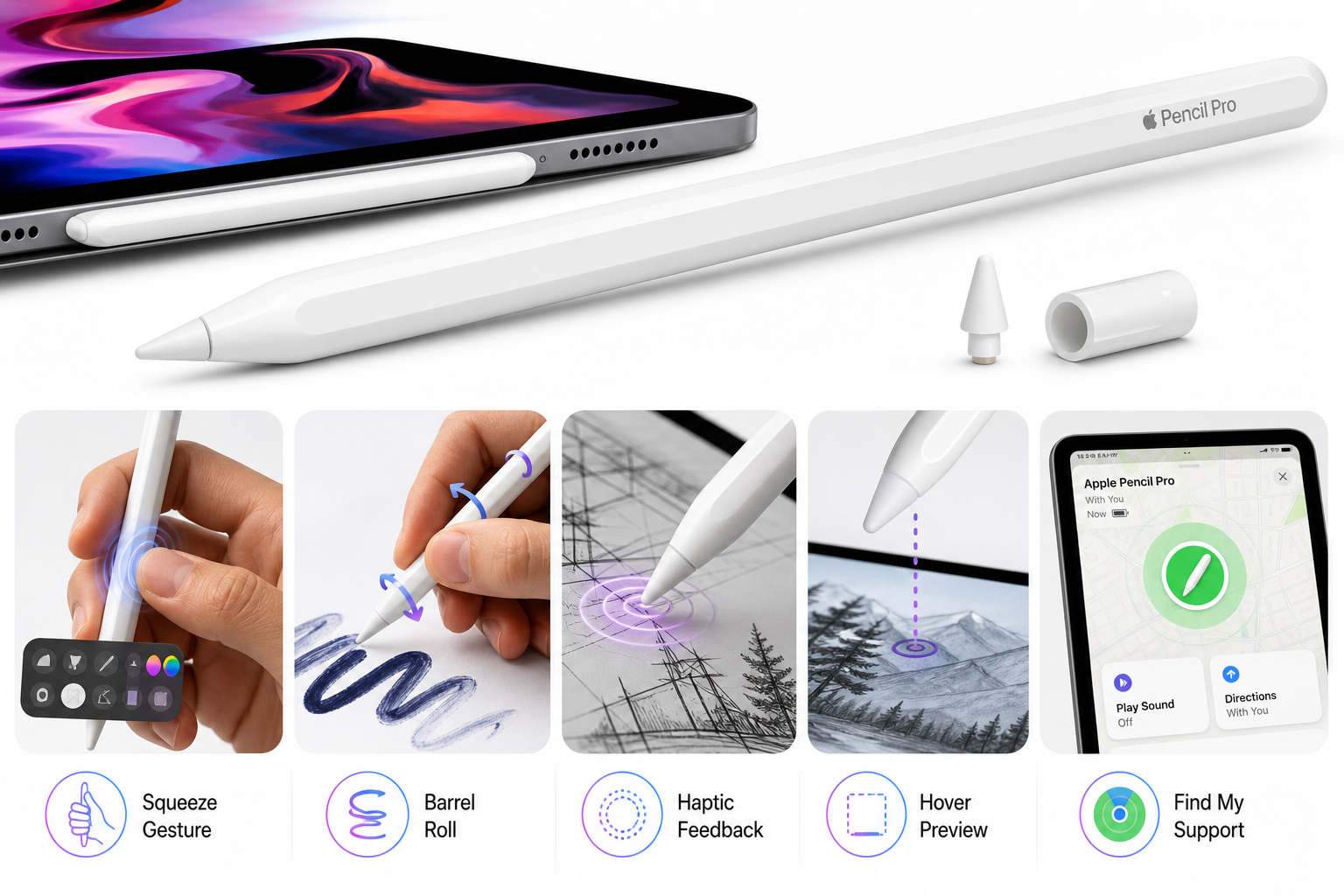
The Apple Pencil Pro is Apple’s flagship stylus for its newest iPad lineup, refining the experience established by the second‑generation Apple Pencil with a suite of additional sensors and interaction features. It offers pixel‑perfect precision, tilt and pressure sensitivity, low latency, and magnetic pairing and charging on the side of supported iPads.
Beyond the basics, the Pencil Pro introduces:
- Squeeze gesture: a pressure‑sensitive band detects when you squeeze the barrel, typically bringing up a tool palette or context menu.
- Barrel roll: a built‑in gyroscope lets apps respond to how you rotate the pencil, enabling realistic control of chisel‑tip markers, calligraphy pens, and other shaped brushes.
- Haptic feedback: a compact haptic engine delivers subtle taps to confirm actions like squeezing, double‑tapping, or snapping to guides.
- Apple Pencil hover (on supported iPads): preview strokes and cursor position before the pencil touches the display.
- Find My support: locate a misplaced Pencil Pro from the Find My app.
Physically, it retains the matte, flattened design that magnetically attaches to the side of compatible iPads for pairing and charging.
From a value standpoint, the Apple Pencil Pro sits at a premium price point of $99.00 on its Amazon product page, reflecting both Apple’s typical accessory pricing and the additional hardware sophistication compared with previous models and third‑party alternatives.
Target Users
The Apple Pencil Pro is best suited to:
-
Digital artists and illustrators
- Those who rely on pressure curves, tilt shading, and fine stroke control will benefit from its advanced sensor suite.
- Apps like Procreate, Affinity Designer, Concepts, and Adobe Fresco can take advantage of barrel roll and haptics for more natural brush behavior.
-
Designers and technical professionals
- UI/UX designers, architects, and engineers working in apps such as Shapr3D, Concepts, or Sketchbook gain from precise input, hover previews, and rotation‑aware tools.
- Haptic feedback can provide subtle confirmation when snapping to alignment guides or selecting tools.
-
Students and heavy note‑takers
- Paired with iPadOS note‑taking apps like Apple Notes, GoodNotes, Notability, or OneNote, the Pencil Pro offers handwriting that feels close to pen and paper while adding searchable notes and cloud sync.
- The squeeze gesture to quickly switch pens, highlighters, or erasers saves time during fast lectures.
-
Educators and presenters
- In classroom or presentation contexts, hover, haptics, and fast tool switching help make live annotation and whiteboarding more fluid.
-
Existing owners of compatible iPads who want the “best” Apple stylus
- Users with the latest iPad Pro (M4/M5), iPad Air (M2–M4), or iPad mini (A17 Pro) who previously used the second‑generation Pencil or third‑party styli will find a noticeably richer experience.
This product is not ideal for:
- Owners of older or entry‑level iPads that do not support Apple Pencil Pro (for them, the first‑generation Apple Pencil or Apple Pencil (USB‑C) is more appropriate).
- Casual users who only occasionally annotate PDFs or sign documents and do not need pressure sensitivity or advanced gestures.
Main Benefits
1. More Expressive, Natural Drawing
The Apple Pencil Pro offers very low latency, high sampling rates, and fine pressure sensitivity, giving strokes that closely track your hand movements. Combined with advanced apps, this enables:
- Smooth line work with predictable pressure curves.
- Tilt‑based shading that mimics real pencils and charcoal.
- Consistent performance across the full iPad display without noticeable jitter for most use cases.
2. Squeeze Gesture for Faster Workflow
The squeeze gesture is one of the Pencil Pro’s headline features. In supported apps, squeezing the barrel can:
- Open a contextual tool palette (brushes, colors, thickness, opacity).
- Trigger mode switches (for example, between draw and erase modes).
- Provide haptic feedback confirming the action.
This reduces trips to on‑screen UI and keeps your focus on your canvas or notes.
3. Barrel Roll for Advanced Brush Control
The integrated gyroscope enables barrel roll, letting you rotate the pencil to adjust the angle of your brush or nib:
- Chisel‑tip markers, calligraphy pens, and airbrushes become angle‑aware, letting you change stroke width and character by simply twisting the stylus.
- Technical drawing and drafting tools can map rotation to ruler angles or perspective guides, offering more nuanced control.
For digital artists who rely on brush shape and direction, this is a major upgrade over the second‑generation Pencil.
4. Haptic Feedback and Hover for Precision
The haptic engine inside the Pencil Pro adds subtle, targeted vibration cues that can:
- Confirm that a squeeze or double‑tap was recognized.
- Provide feedback when snapping to shape guides, grid lines, or selection boundaries.
- Enhance the feel of certain in‑app tools, like impact when stamping brushes.
On compatible iPads, hover lets you see a cursor or brush preview up to a small distance above the glass. Combined with haptics, this enables:
- More precise placement of strokes, selection marquees, and annotations.
- Reduced accidental marks, since you can adjust before committing.
5. Seamless Magnetic Pairing, Charging, and Transport
Like the second‑generation Pencil, the Pro:
- Attaches magnetically to the side of compatible iPads.
- Pairs and charges wirelessly through that magnetic connector.
- Shows charge status in iPadOS and supports quick top‑ups.
This design eliminates loose charging cables, USB‑C ports on the stylus, or external docks, and makes the pencil easy to carry with the tablet.
6. Deep Integration with iPadOS and Find My
Because it is a first‑party accessory:
- Configuration and firmware updates happen directly through iPadOS.
- System gestures (scribble to text, screenshot markup, Quick Note, etc.) are well‑integrated.
- Find My support lets you locate a misplaced Pencil Pro, reducing the risk of losing an expensive stylus.
Key Considerations
1. Strict Device Compatibility
The Apple Pencil Pro only works with select newer iPad models. Before purchasing from Amazon or any retailer, you must verify that your device is listed among the supported models (as highlighted on Apple’s official compatibility list and the Amazon product page at https://www.amazon.com/dp/B0D3J71RM7).
If you own:
- An older iPad Pro, iPad Air, iPad mini, or a standard iPad (including some recent “A‑series” iPads), the Pencil Pro may not be supported.
- A compatible model but an outdated iPadOS version, you may need to update to iPadOS 17.5 or later to enable full functionality.
Buying the Pencil Pro without confirming compatibility is one of the most common sources of user frustration.
2. Premium Pricing
The Apple Pencil Pro is positioned as Apple’s top‑tier stylus, and its price on Amazon ($99.00 at the time of writing) reflects that. For some users, this will be justifiable given the added sensors and tight ecosystem integration. For others—especially casual note‑takers—it may be hard to justify compared with cheaper styluses or older Apple Pencils.
3. App Support for Pro Features
While the Pencil Pro works as a regular pressure‑ and tilt‑sensitive stylus across iPadOS, not all apps fully support barrel roll, custom squeeze actions, or haptic interactions yet. Over time, more apps are likely to adopt these features, but early adopters may find the experience uneven:
- Pro‑grade art and design apps typically add support faster.
- Simpler note‑taking or PDF markup apps may only use basic pressure and tilt.
4. Durability and Tip Wear
Like previous Apple Pencils, the Pro uses replaceable tips. Heavy artists and note‑takers can expect tip wear over time, especially on screen protectors with a paper‑like texture. Replacement tips are an additional ongoing cost to factor into ownership.
5. Battery and Charging Behavior
The internal rechargeable battery is designed to last through typical daily use and charges whenever the Pencil is magnetically docked to the iPad. However:
- If you store the iPad separately from the Pencil, or leave the Pencil unused for extended periods, you may occasionally encounter low or depleted battery when you pick it up.
- Always ensure the Pencil is properly attached to the charging edge of the iPad; a misaligned connection can leave it uncharged.
Pros
- Excellent drawing and writing performance with low latency, tilt and pressure sensitivity, and pixel‑level accuracy.
- Squeeze gesture enables faster access to tools, colors, or modes without leaving the canvas.
- Barrel roll (gyroscope‑based rotation sensing) provides advanced brush and tool control for artists and designers.
- Haptic feedback offers satisfying, subtle confirmation of interactions like squeeze, double‑tap, and snapping.
- Hover support (on compatible iPads) improves precision placement of strokes and selections.
- Magnetic attachment, pairing, and charging keep the Pencil Pro charged and easy to carry.
- Tight integration with iPadOS and strong support in major creative and productivity apps.
- Find My integration helps locate a misplaced pencil.
- Clean, minimal industrial design consistent with Apple’s ecosystem.
Cons
- Limited compatibility: only works with specific newer iPad models; many existing devices are excluded.
- High price ($99.00 on Amazon at the time of writing) relative to third‑party styluses and older Apple Pencils.
- Advanced features are app‑dependent; some apps may not yet support squeeze customization, barrel roll, or haptics.
- Extra cost for replacement tips over the life of the device.
- Users who mainly annotate or sign documents may not fully benefit from the Pro‑level features.
Alternatives
If you’re evaluating whether the Apple Pencil Pro is the right choice, consider these categories of alternatives. Note that you should verify specific models and pricing separately, as this article focuses on the Amazon listing for the Apple Pencil Pro at https://www.amazon.com/dp/B0D3J71RM7.
1. Other Apple Pencil Models
-
Apple Pencil (2nd generation)
- Works with a wider set of older iPad Pro and iPad Air models.
- Offers magnetic charging, pressure and tilt sensitivity, and double‑tap switching between tools.
- Lacks the squeeze gesture, barrel roll, haptics, and Find My support of the Pro.
- Better suited to users who own an older but still capable iPad Pro or Air.
-
Apple Pencil (USB‑C)
- An affordable option compatible with several recent non‑Pro iPads.
- Provides tilt sensitivity but typically does not offer pressure sensitivity and lacks advanced Pro features.
- A sensible choice for casual note‑taking or occasional markup when cost is the primary factor.
-
Apple Pencil (1st generation)
- Compatible with certain older Lightning‑based iPads.
- Offers pressure sensitivity and tilt, but no magnetic charging or advanced gestures.
- Primarily for users with legacy devices who don’t want to upgrade their tablet.
2. Third‑Party Styluses
There are many third‑party active styluses designed for iPads. In general, they:
- Cost significantly less than the Apple Pencil Pro.
- Often support basic palm rejection and tilt, but may lack true pressure sensitivity, barrel roll, or haptics.
- Rarely integrate as tightly with iPadOS and cannot match the system‑level support Apple grants its own hardware.
For occasional annotation or simple note‑taking, these can be adequate. For professional art and design, they often fall short of the Pencil Pro’s accuracy, latency, and feature set.
Conclusion
The Apple Pencil Pro is a substantial step forward in Apple’s stylus lineup. With squeeze gestures, barrel roll, haptic feedback, hover support, and magnetic charging, it directly addresses the workflow needs of digital artists, designers, and serious note‑takers who use compatible iPad models.
Its biggest strengths lie in the quality of the drawing experience, the efficiency gains from new gestures, and its deep integration with iPadOS and leading creative apps. At the same time, the Pencil Pro’s premium price ($99.00 on Amazon) and strict compatibility requirements mean it won’t be the right choice for everyone.
If you own a supported iPad Pro, iPad Air, or iPad mini and rely heavily on your tablet for creative or professional work, the Apple Pencil Pro is one of the best stylus experiences currently available for iPad. For more casual users or those on older hardware, one of the other Apple Pencil models or a lower‑cost third‑party stylus may be a more sensible match.