
Labstandard Professional Wireless Lavalier Lapel Microphone Review: Budget-Friendly Plug‑and‑Play Audio for iPhone and iPad
Quick Summary
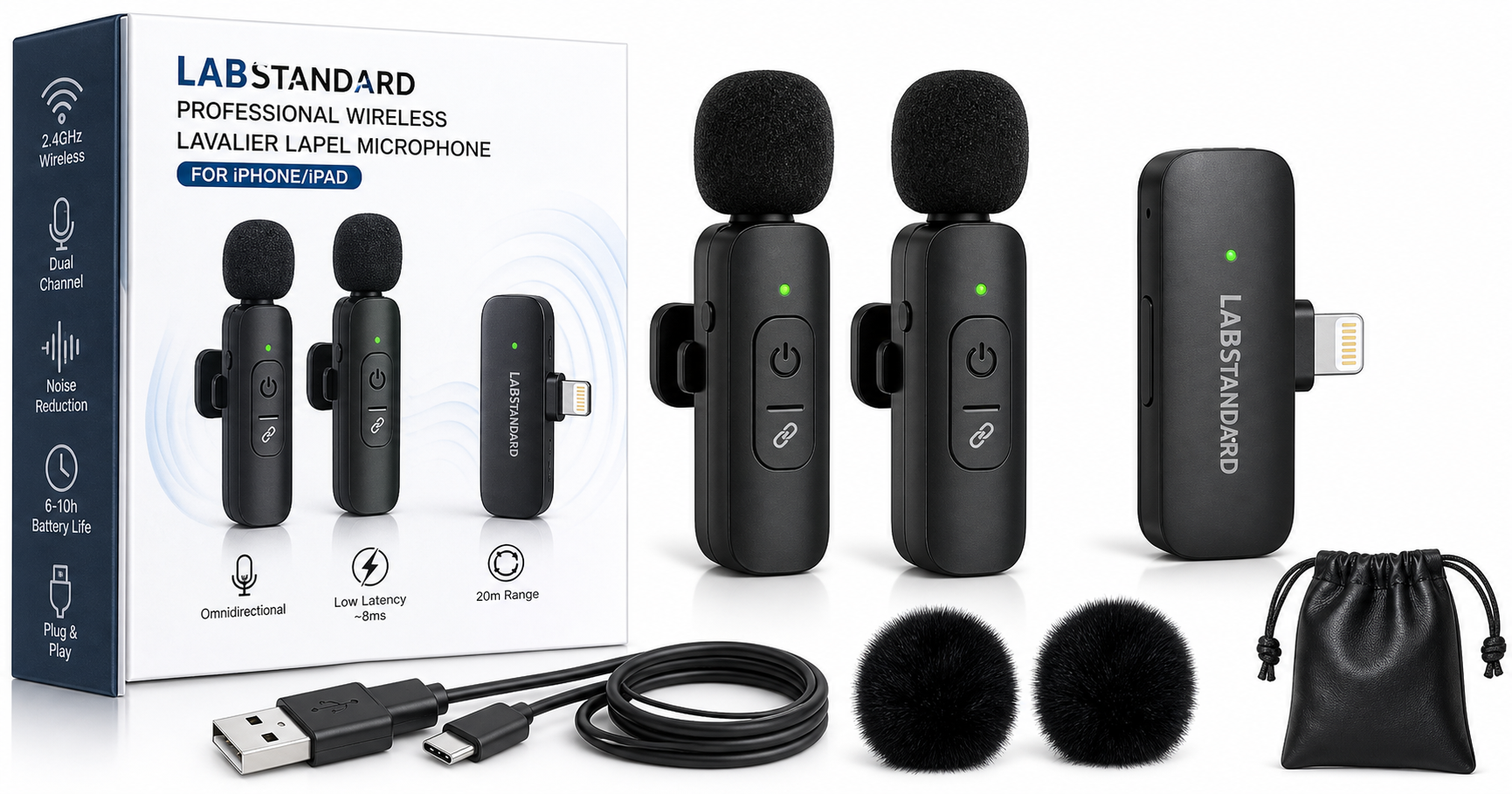
The Labstandard Professional Wireless Lavalier Lapel Microphone for iPhone, iPad, mini is a compact wireless mic kit aimed at users who want better audio than their phone’s built‑in microphone, without dealing with complex audio gear.
- Form factor: Two mini clip‑on wireless microphones and a small receiver that plugs into your device’s Lightning (and in some packages, USB‑C/3‑in‑1) port.
- Intended use: Interviews, short‑form video, TikTok/Reels, YouTube vlogs, podcasts, Zoom/Teams calls, and basic livestreaming.
- Key features: 2.4 GHz digital wireless link, dual‑channel (two mics to one receiver), omnidirectional pickup, built‑in noise reduction, ultra‑low latency, and plug‑and‑play operation—no separate app or Bluetooth pairing required. (manuals.plus)
- Who it’s for: Entry‑level creators, educators, and small business owners who need simple, portable audio for phones and tablets.
If you’re looking for an inexpensive, easy‑to‑use microphone solution for iPhone/iPad, this kit offers a straightforward way to lift your vocal quality above built‑in mics, provided you accept its limitations in build quality, advanced controls, and long‑distance reliability.
Typical street pricing around $8.99 makes it clearly a budget‑class option compared with more established wireless systems.
Detailed Analysis
Design and Build Quality
The Labstandard kit is built around a classic modern wireless‑lav layout:
-
Transmitters: Two small plastic clip‑on microphone units with integrated capsules. Each includes:
- A clip to attach to clothing (collar, lapel, shirt placket).
- Simple on/off and pairing controls, and a small status LED.
- Built‑in rechargeable batteries charged via USB‑C. (manuals.plus)
-
Receiver: A compact dongle that plugs directly into your phone or tablet. Depending on configuration, it may provide a Lightning connector (for most iPhones and iPads) and, in some variants, USB‑C or 3‑in‑1 support for additional devices. (modazone.co)
-
Accessories: Typical bundles include a charging cable and basic documentation; some third‑party listings mention additional windshields or storage pouches, but these can vary by seller.
Materials are mostly lightweight plastic. This keeps the transmitters unobtrusive on clothing and reduces strain on your device port, but it also means the mic bodies and clips don’t feel as robust as higher‑end systems. For occasional or light daily use this is generally acceptable; for heavy, professional field use you may want something more rugged.
Wireless Technology and Specifications
According to the product documentation, the Labstandard system uses 2.4 GHz digital transmission with dual‑channel support, allowing two microphones to send audio to a single receiver. (manuals.plus) Key advertised specs include:
- Latency: Around 0.008 s (8 ms) in ideal conditions, effectively real‑time for speech and video sync.
- Range: Up to ~20 meters (unobstructed line of sight). Walls, crowds, and interference can shorten this significantly. (manuals.plus)
- Battery life: Approximately 6–10 hours on a full charge, depending on use and environmental conditions.
- Polar pattern: Omnidirectional, capturing sound from all directions around the capsule.
These numbers are typical of entry‑level 2.4 GHz wireless lavalier systems. The low latency is especially important for live video and on‑camera talking‑head recordings where lip‑sync errors are distracting.
Compatibility
The Labstandard is primarily marketed for:
- iPhone and iPad (Lightning port)
- Some USB‑C / 3.5 mm devices in multi‑port versions, such as certain Android phones, tablets, and cameras, depending on the exact receiver variant. (modazone.co)
Because it presents itself as a digital audio device through the physical connector, there’s no need for Bluetooth pairing or a dedicated app. Most iOS recording, camera, and streaming apps will simply detect it as an external microphone.
That said, real‑world compatibility can depend on:
- Your iOS version
- Whether you’re using official vs. third‑party adapters on newer iPhones
- Whether the app you’re using respects external mic input
If you own very recent iPhone or iPad hardware with only USB‑C, you’ll need to verify that your specific Labstandard package includes a compatible USB‑C receiver or a reliable adapter; cheap adapters are a common point of failure with budget wireless mics.
Audio Performance
For its class, the Labstandard aims to offer a noticeable upgrade over internal phone microphones rather than studio‑grade sound. Based on the published specs and typical performance of similar omnidirectional lav kits, here’s what to expect:
- Vocal clarity: Placing the mic close to the speaker’s mouth (on the lapel or collar) yields a clear, present vocal tone that’s significantly better than the distant, echo‑prone sound of built‑in phone mics.
- Noise reduction: The system incorporates a built‑in noise‑reduction chip intended to suppress background noise. (manuals.plus) This can help tame constant low‑level hiss or hum, but it is not magic—strong wind, loud music, or traffic will still be audible.
- Tone: Like most inexpensive lavaliers, the tonality is slightly bright with some emphasis on the upper‑midrange, which helps speech intelligibility but can sound thin or sibilant with certain voices.
- Dynamic handling: The mic is tuned for spoken word at conversational levels. Very loud shouting close to the capsule can cause distortion; soft talkers may need to keep the mic a bit closer.
In quiet indoor environments—home offices, classrooms, small studios—the Labstandard should deliver clean enough audio for online courses, explainer videos, and casual podcasts. Outdoors or in very noisy environments, you’ll want to combine good mic placement, wind protection, and perhaps some post‑processing in your editing software.
Latency and Sync
The advertised latency of about 8 ms is low enough that, in practice, you won’t notice any delay between speech and recorded video when using typical phone camera apps. (manuals.plus) This is an advantage over some Bluetooth‑based solutions where lag can be obvious.
User Experience
Setup and Pairing
The Labstandard is designed to be “plug and play”:
- Plug the receiver into the Lightning (or compatible) port of your iPhone/iPad.
- Power on the transmitters. They are usually factory‑paired to the receiver and connect automatically.
- Open your camera or recording app. The phone should recognize the external mic input.
- Clip the mic to your clothing, do a quick test recording, and adjust placement.
For most users, this is far simpler than configuring larger camera‑mounted wireless systems or multi‑step Bluetooth pairing routines.
Everyday Use
In daily use scenarios such as:
- Recording talking‑head content for YouTube or TikTok
- Hosting a live Q&A over Instagram Live or similar platforms
- Teaching or tutoring via Zoom or Teams on an iPad
…the Labstandard’s strongest advantage is convenience. You can keep the kit in your bag, plug in the receiver, clip on the mic, and be ready in seconds.
Dual‑channel support means you can mic two speakers at once (for example, an interviewer and guest) without needing a second receiver. The combined audio is mixed down to a single signal on most phones, simplifying basic workflows but limiting post‑production flexibility.
Comfort and Ergonomics
The transmitters are light enough that they don’t drag on typical shirts or collars, although very thin fabrics may sag slightly. The clips are adequate for casual movement but not designed for vigorous physical activity.
Because the receiver occupies your charging/data port, you generally cannot charge your phone while using the mic, unless your specific bundle includes a pass‑through port on the receiver or you add additional accessories.
Reliability Considerations
Most 2.4 GHz wireless systems—including this one—share spectrum with Wi‑Fi and Bluetooth devices. In congested environments (trade shows, busy offices, conference halls), you may experience:
- Reduced effective range
- Occasional signal dropouts or brief glitches
Keeping a clear line of sight between mic and receiver and staying within a modest distance (e.g., 5–10 meters) will help maximize reliability.
Pros
- Budget‑friendly pricing (around $8.99), making it accessible to beginners and casual creators.
- True plug‑and‑play operation with iPhone/iPad—no apps or Bluetooth pairing.
- Dual‑channel system: two microphones with one receiver, ideal for interviews and co‑hosts. (manuals.plus)
- Omnidirectional pickup captures consistent speech even if the subject turns their head.
- Built‑in noise reduction helps cut down some ambient and electronic noise.
- Low latency (advertised ~8 ms) keeps audio and video in sync for most use cases.
- Compact and lightweight transmitters and receiver are easy to carry and wear.
- Rechargeable batteries with 6–10 hours of advertised runtime support longer sessions.
Cons
- Build quality is basic, with lightweight plastics and clips that may not withstand heavy professional use.
- Sound quality is good for speech but not “studio‑grade,” with some brightness and potential for sibilance.
- Range and stability can be affected by obstacles and crowded 2.4 GHz environments.
- Limited control options—no on‑device gain knobs, EQ, or detailed configuration.
- Receiver blocks your device’s charging/data port, often preventing simultaneous charging during long shoots.
- Mixed dual‑mic output on many phones means less flexibility to edit each speaker separately after recording.
- Compatibility nuances with newer USB‑C‑only iPhones/iPads may require specific receiver variants or quality adapters.
Value Assessment
Positioned firmly in the budget wireless lavalier segment, the Labstandard Professional Wireless Lavalier Lapel Microphone is all about value and convenience rather than premium audio or industrial durability.
- At roughly $8.99, it sits well below established wireless systems from larger pro‑audio brands, but still delivers a tangible upgrade over onboard phone microphones.
- Dual transmitters, plug‑and‑play connectivity, and advertised low latency make it particularly compelling for:
- Solo creators who occasionally host guests on‑camera
- Teachers and trainers recording lectures or tutorials
- Small businesses shooting product explainers or social media promos
If your primary needs are simple setup, portability, and “good enough” spoken‑word sound, the Labstandard offers strong price‑to‑performance value. However, if you:
- Frequently shoot in challenging radio‑frequency environments,
- Need robust build quality for constant travel or professional event work, or
- Require more refined audio with individual channel recording and detailed controls,
…you may eventually outgrow this kit and want to invest in higher‑end wireless solutions.
Final Thoughts
The Labstandard Professional Wireless Lavalier Lapel Microphone for iPhone and iPad delivers what many entry‑level creators actually need: a compact, affordable, and easy‑to‑use way to sound noticeably better than a bare smartphone.
It isn’t the most rugged or feature‑rich wireless system on the market, and its audio character is tuned more for intelligible speech than for critical listening. But for the target audience—vloggers, podcasters, online teachers, and small businesses working primarily with phones and tablets—it offers a practical balance of price, performance, and simplicity.
If you’re stepping up from your phone’s built‑in mic and want a plug‑and‑play dual‑mic solution without investing in complex gear, the Labstandard is a sensible starting point. As long as you manage expectations around build quality and advanced controls, it can be a reliable everyday tool for creating clearer, more professional‑sounding content.