
Logitech M330 Silent Wireless Mouse Review: Quiet Comfort for Everyday Use
Introduction
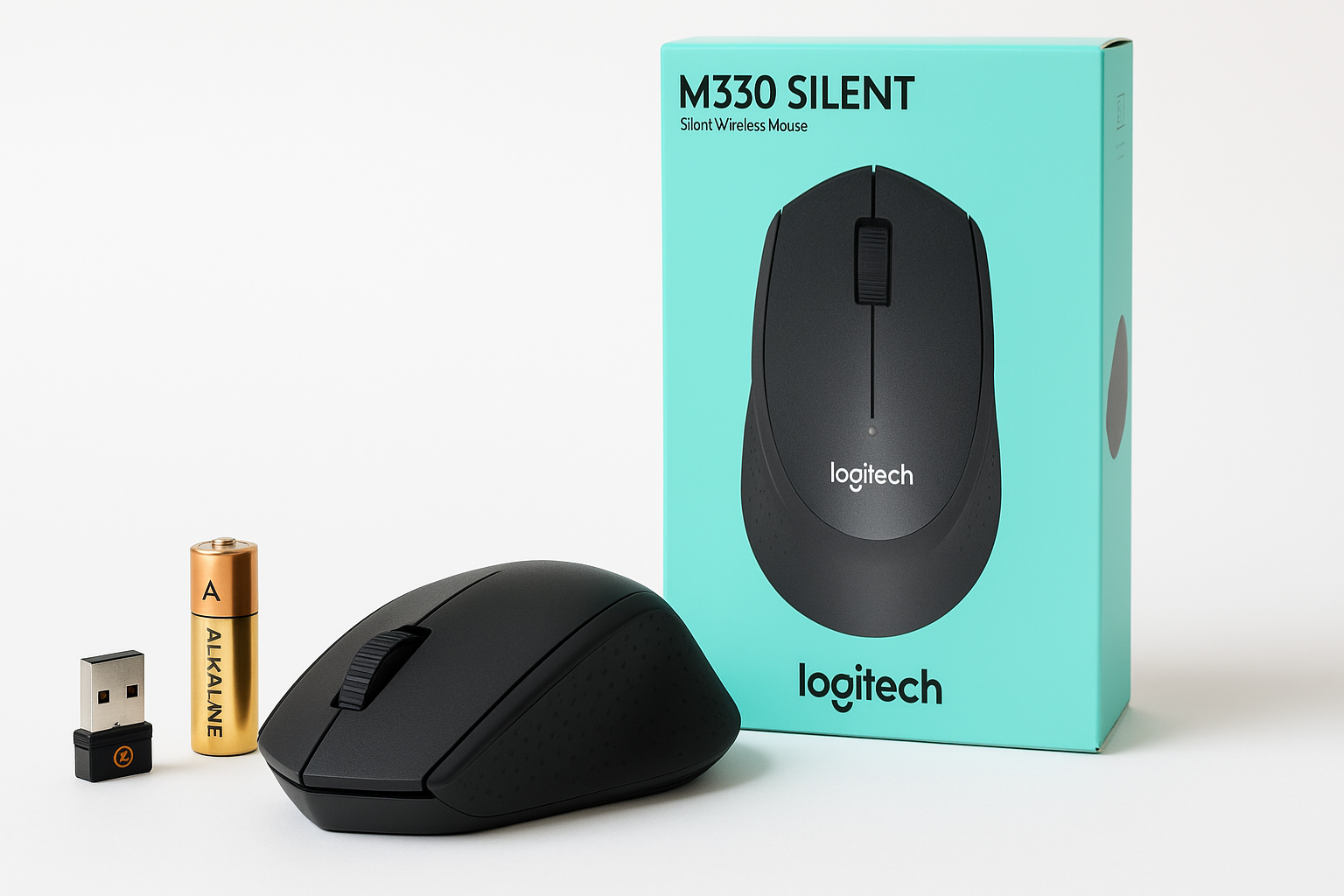
The Logitech M330 Silent Wireless Mouse is built around a simple idea: keep the familiar feel of a traditional mouse click while dramatically reducing the sound it makes. Using Logitech’s SilentTouch technology, the M330 claims to cut click noise by over 90% compared with typical mice, without sacrificing responsiveness or accuracy.
This is a compact, right‑handed mouse that connects via a 2.4GHz USB nano receiver, works with Windows, macOS, ChromeOS, and many Linux distributions, and is powered by a single AA battery designed to last up to two years, depending on usage. Combined with its soft rubber side grips and relatively light weight, the M330 targets users who want a comfortable, low‑maintenance pointing device that won’t disturb colleagues, family members, or roommates.
If you’re shopping for a quiet mouse for work, study, or general home use and have noticed it available around $19.99, this review will help you understand what you can realistically expect from the M330.
Typical Use Cases
1. Office and Professional Work
The M330 is clearly optimized for office environments where noise and comfort matter more than gaming‑grade responsiveness. Typical tasks include:
- Working in productivity suites (Word, Excel, Google Docs/Sheets)
- Email and calendar management
- Web browsing and research
- Light document annotation and PDF review
The near‑silent clicks and subdued scroll wheel sound make it suitable for open‑plan offices, shared desks, and quiet meeting rooms.
2. Studying and Remote Learning
For students using laptops or Chromebooks in libraries, classrooms, or shared apartments, the M330 offers:
- Quiet operation during note‑taking and research
- Simple plug‑and‑play setup with school‑issued devices
- Compact size that fits easily in a backpack or laptop sleeve
Its long battery life reduces the likelihood of the mouse dying during an exam or lecture.
3. Home and Shared Living Spaces
In homes where one person works late while others sleep, or where desks are close together, the M330’s low noise profile is a strong fit. Typical uses include:
- General web browsing and streaming
- Online shopping and bill payment
- Light photo management and basic editing
It suits living rooms, kitchen tables, and bedroom workstations where click noise might otherwise be distracting.
4. Light Creative and Productivity Tasks
While not a specialist creative mouse, the M330 can handle:
- Basic photo cropping and adjustments
- Simple design tasks in browser‑based tools
- Managing timelines in light video editing, as long as you’re not seeking pixel‑perfect control
Users who occasionally dip into creative software but don’t rely on it full‑time may find the precision adequate.
5. Travel and Mobile Work
Because the M330 uses a tiny nano receiver that can stay in the laptop’s USB port, it works well for:
- Business travel with a Windows laptop or Chromebook
- Hot‑desking between multiple office locations
- Working in coworking spaces and cafés where quiet operation is appreciated
Its small footprint and low weight make it easy to pack, and the AA‑battery power means you don’t need to remember a charging cable.
Performance in Each Scenario
Office and Professional Work
In day‑to‑day productivity tasks, the M330’s 1000 dpi optical sensor feels accurate and predictable. Pointer movement is smooth on typical desk surfaces and mouse pads, and tracking remains consistent during extended sessions. The left and right buttons provide a familiar actuation feel but with a muted sound, so you retain tactile feedback without the sharp click.
For spreadsheet work and document navigation, the scroll wheel offers line‑by‑line scrolling rather than ultra‑fast free‑spin modes found on some premium Logitech models. This conservative approach favors precision when moving through long documents or web pages, though power users who rely on rapid scrolling may find it slower.
Wireless performance in a typical office remains stable. The 2.4GHz connection over the nano receiver generally maintains a solid link with no obvious lag or dropouts at standard desktop distances. The quoted range (around 10 meters in open space) is more than enough for normal use.
Overall, for classic office workloads, the M330 delivers predictable, quiet performance that aligns well with its design goals.
Studying and Remote Learning
When used with laptops or Chromebooks, the M330 pairs quickly: plug in the nano receiver and the mouse is ready in seconds on most operating systems with no driver installation. This plug‑and‑play behavior is ideal for students who may not have admin rights on school devices.
During extended note‑taking sessions or online classes, the shaped right‑hand contour helps reduce hand fatigue compared to flat, compact travel mice. The rubber side grips maintain a secure hold, even if your hands get slightly sweaty over long periods.
Battery life is a strong advantage here. With up to roughly 18–24 months of life from a single AA battery (depending on use and conditions) and auto‑sleep when idle, you can realistically go multiple semesters without a battery change, especially under moderate student workloads.
Home and Shared Living Spaces
In bedrooms, living rooms, and shared study areas, the M330’s quiet switches are its standout feature. Clicks are significantly dampened, which is noticeable if you’re used to typical mechanical‑feeling mouse buttons.
For casual use—browsing, streaming, social media, and email—the sensor provides more than enough responsiveness. Most users will not encounter tracking issues on typical home surfaces like wooden desks or mouse pads, though highly reflective or glass surfaces may still require a mouse pad for best results.
The mouse’s modest size fits well for medium‑sized hands and is serviceable for smaller or slightly larger hands. Palm grippers may find it a bit compact, while claw and fingertip grippers will likely adapt easily.
Light Creative and Productivity Tasks
In creative tools such as photo editors or basic layout apps, the M330’s 1000 dpi sensor is accurate enough for rough selections, cropping, and adjustment sliders. However, it does not offer adjustable DPI or high‑resolution tracking tailored for design or complex retouching work.
For occasional creative tasks in a quiet home or office, it performs acceptably. For professionals who spend hours a day in pixel‑level editing, a higher‑end mouse with more buttons, higher DPI, and customizable profiles will be more suitable.
Travel and Mobile Work
On the road, the M330 benefits from its simple setup. The nano receiver is small enough to leave in a laptop port, reducing the risk of misplacing it. Because it runs on an AA battery, you’re not dependent on charging—swapping in a fresh battery takes seconds if needed.
The plastic shell and compact shape hold up well to being tossed into a bag, and the lack of moving parts beyond the wheel and buttons limits the chance of damage. The quiet operation is also an advantage in airplanes, trains, and shared workspaces, where noisy clicks can draw unwanted attention.
Strengths Across Scenarios
-
Exceptionally Quiet Operation
The defining feature of the M330 is its reduced click noise. Logitech’s implementation preserves a tactile click while substantially muting the sound, which benefits:- Open‑plan offices
- Libraries and classrooms
- Night‑time use at home while others sleep
-
Comfortable Right‑Handed Design
The subtly contoured shape and soft rubber side grips support the hand in a natural position. While it’s not a large ergonomic mouse, it strikes a balance between portability and comfort, making it suitable for:- Long workdays at a desk
- Extended study sessions
- Mixed home and office use
-
Long Battery Life and Low Maintenance
With an advertised multi‑month to multi‑year battery life from a single AA cell and auto‑sleep power saving, the M330 is effectively a set‑and‑forget device. You can:- Use it daily without thinking about charging schedules
- Pack it for travel with confidence it will work when needed
- Minimize downtime due to dead batteries
-
Reliable 2.4GHz Wireless Connection
The included USB nano receiver provides a stable, low‑latency wireless link. For most productivity and everyday tasks, responsiveness feels indistinguishable from a wired mouse. -
Broad OS Compatibility and Simple Setup
Plug‑and‑play operation across Windows, macOS, ChromeOS, and many Linux systems makes the M330 versatile for mixed environments. There is generally no need for additional drivers or software, which is particularly useful on restricted corporate or school machines. -
Compact and Lightweight
The mouse’s size and weight make it easy to transport in a laptop bag, without being so small that it becomes uncomfortable for most users. This balance favors users who split time between home, office, and travel. -
Good Value for Its Feature Set
Considering the quiet click technology, long battery life, and overall build quality, the M330 typically represents solid value in the mid‑range wireless mouse segment, especially when discounted around $19.99.
Limitations Across Scenarios
-
Right‑Handed Only
The sculpted shape is optimized for right‑handed users. Left‑handed users will find it less comfortable and may prefer a symmetric (ambidextrous) design. -
No Bluetooth Connectivity
The M330 relies solely on its 2.4GHz USB nano receiver. This means:- You must have a free USB‑A port
- It’s less convenient for modern laptops with limited or USB‑C‑only ports (you may need an adapter)
- You cannot easily switch between multiple devices without moving the receiver
-
Limited Buttons and Features
With just three standard buttons (left, right, and scroll wheel/middle click), there are no dedicated back/forward buttons on the side and no advanced function keys. Power users who rely on extra buttons for navigation, shortcuts, or macros may find it too basic. -
Fixed DPI and Modest Sensor Specs
The 1000 dpi optical sensor is fine for everyday computing but lacks adjustable DPI levels or the high resolution demanded by competitive gamers or detail‑oriented creative professionals. -
Not Ideal for Fast‑Paced Gaming
While the M330 can certainly be used for casual games, it is not designed for:- High‑DPI, low‑latency competitive shooters
- Gaming setups that demand extensive button customization and on‑the‑fly sensitivity changes
-
Small to Medium Size May Not Suit Very Large Hands
Users with larger hands who prefer a full palm grip might find the M330 on the smaller side, potentially leading to fatigue over very long sessions.
Verdict
The Logitech M330 Silent Wireless Mouse is a well‑executed solution for users who prioritize quiet operation, comfort, and reliability in everyday computing. Its standout silent‑click design, long battery life, and straightforward 2.4GHz wireless connection make it especially appealing for office workers, students, and home users sharing close quarters with others.
It is not a feature‑rich, multi‑device, or gaming‑oriented mouse. You won’t find adjustable DPI, side buttons, or Bluetooth here, and left‑handed users will likely want to look elsewhere. However, within its focused brief—providing a quiet, comfortable, maintenance‑light pointing device—it performs consistently well.
If you’re looking for a simple, quiet, and dependable wireless mouse for everyday tasks and typically see it offered around $19.99, the Logitech M330 Silent Wireless Mouse is an easy product to recommend. It’s a practical upgrade from noisy basic mice and a strong fit for noise‑sensitive workspaces and shared living environments.