
Minecraft (Amazon Appstore Edition) Review: Sandbox Creativity on Mobile and Fire Tablets
Introduction
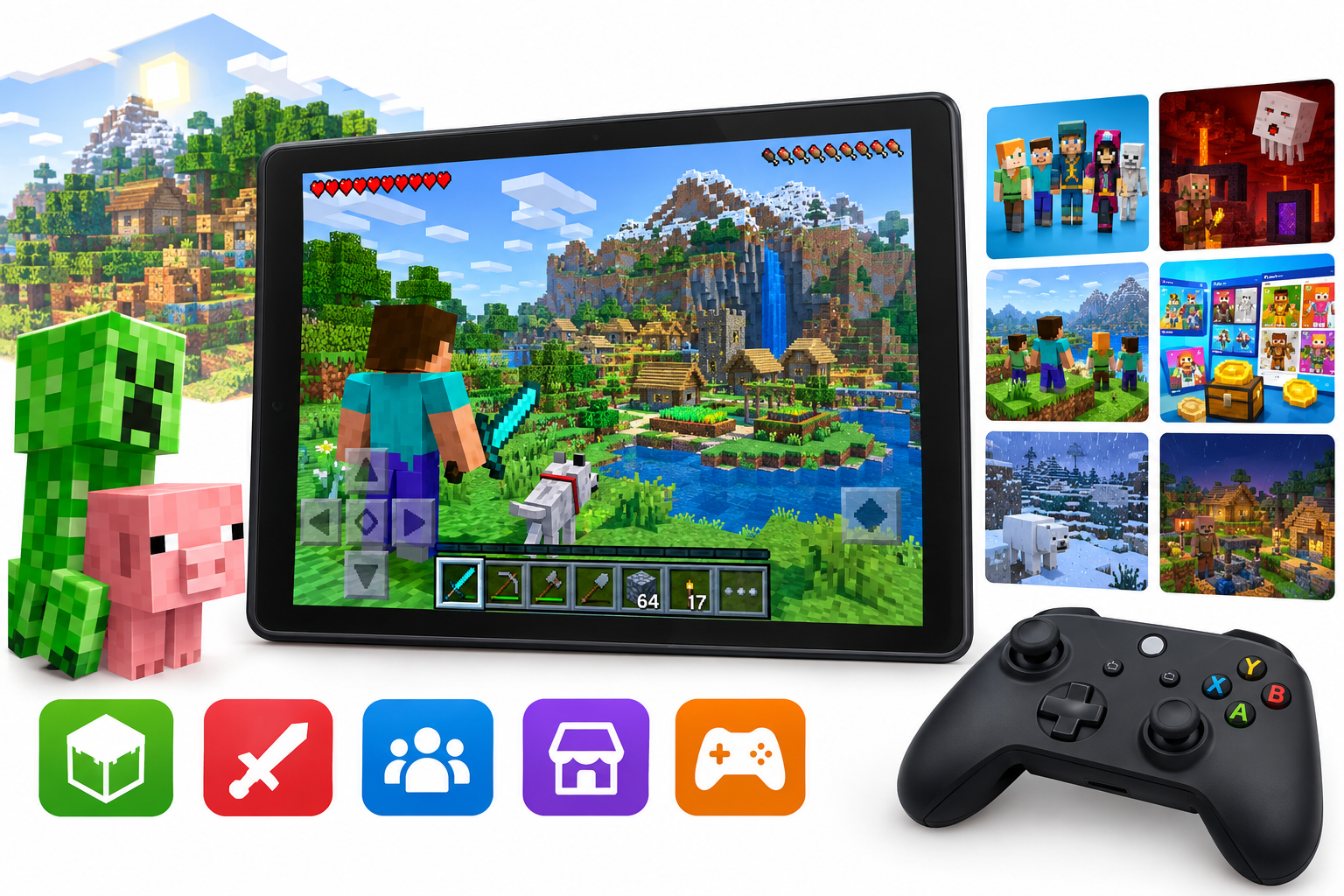
Minecraft for the Amazon Appstore (ASIN: B00992CF6W) is Mojang’s mobile version of the globally popular sandbox game, tailored for Android and Fire OS devices. Often referred to historically as Minecraft: Pocket Edition, this release now forms part of the Bedrock family, sharing core code with other modern platforms such as Windows 10 and consoles.
Available via the Amazon Appstore at around $0.00, this edition brings the full Minecraft experience—blocky worlds, survival challenges, and limitless creativity—to phones, tablets, and in particular Amazon’s Kindle Fire line.
Product overview and key features
Core sandbox gameplay
At its heart, Minecraft on Amazon devices offers the same core loop that made the franchise a phenomenon:
- Procedurally generated worlds with diverse biomes, caves, oceans, villages, and structures to discover.
- Two primary modes:
- Survival: gather resources, craft tools, build shelters, and fend off hostile mobs.
- Creative: unlimited blocks, instant flight, and no health or hunger, ideal for building and experimenting.
- Crafting and progression: players move from wooden tools to enchanted gear, automated farms, and complex bases as they explore and mine.
The Amazon Appstore listing highlights several specific feature pillars for this edition:
- Skins and texture packs – Built-in support for cosmetic packs, including themed skin bundles like biome settlers and city folk, plus various texture packs for different visual styles. (42matters.com)
- The Nether and its inhabitants – Access to the dangerous Nether dimension, including Ghasts, Piglins/Pigmen, and other mobs that expand late-game progression and resource variety. (42matters.com)
- Cross‑platform play – Up to five players can join the same world across compatible Bedrock platforms such as Windows 10 and mobile, allowing Fire tablet users to play with friends on PCs or other mobile devices. (42matters.com)
- Xbox Live / achievements support (where available) – Integration with Xbox Live accounts for achievements and cloud-related features on Bedrock. (worldindata.com)
Controls and interface
Minecraft’s Amazon edition is built around touchscreen controls, with optional controller support:
- Revamped touch controls – A virtual D‑pad and on-screen interaction buttons let players move, jump, and place/break blocks. The UI has been tuned for handheld screens, with accessible hotbars and inventory. (42matters.com)
- Controller support – Physical game controllers (such as those used with Fire TV or supported Bluetooth controllers on tablets) are recognized, and an in-game mapping screen allows customization of button layouts for a more console-like experience. (42matters.com)
Weather, mobs, and world details
Compared with early Pocket Edition releases, the Amazon Appstore version now offers a much richer simulation:
- Enhanced weather effects – Including accumulating snow and more dynamic environmental changes that impact how worlds look and feel over time. (42matters.com)
- Expanded mob roster – Beyond familiar enemies like Zombies and Creepers, the game includes passive and neutral creatures such as ocelots and bunnies, adding variety to exploration and farming. (42matters.com)
- Villages and updates – Modern Bedrock updates (e.g., Village & Pillage and beyond) bring redesigned villages, new villager jobs, and additional threats and structures, ensuring the Amazon edition remains broadly aligned with other Bedrock platforms. (usbannerads.com)
Marketplace, commands, and add‑ons
On compatible devices, the Amazon build supports several customization and monetization layers that significantly extend replay value:
- Marketplace – An in-game store featuring maps, skin packs, and texture packs from Mojang and community creators. This content is purchased using Minecoins and allows players to quickly access new adventures or cosmetic sets. (usbannerads.com)
- Slash commands – Players can tweak world behavior via commands (e.g., changing time of day, spawning mobs, or giving items), especially useful in creative or custom maps. (worldindata.com)
- Add‑ons – Data-driven behavior and resource packs can be installed to modify mobs, items, or game rules, enabling lightweight modding on mobile without a full Java-style mod loader. (usbannerads.com)
Performance and user experience
Device compatibility and performance
Because this edition targets Android and Fire OS devices, performance and visual fidelity depend heavily on hardware:
- On modern mid-range or better Fire tablets and Android phones, Minecraft typically runs smoothly with default render distance and graphics settings.
- On older or low-end devices, users may see reduced frame rates, longer world load times, and occasional stutter, especially in large or heavily built worlds.
- Render distance and graphics settings can be tuned downward to prioritize performance over view distance.
The Bedrock engine is optimized for mobile and low-power hardware, resulting in generally good performance relative to the game’s scope, but it is still a fully 3D sandbox and can tax aging devices. The Amazon listing and price-tracking data show a large user base and strong average ratings (around 4.3–4.5 stars), suggesting that most players find performance acceptable on supported hardware. (42matters.com)
Controls in practice
The touch controls are serviceable but not perfect:
- Building and mining: Single-block placement and removal are straightforward, but intricate builds can feel slower and less precise than on PC or console.
- Combat: Maneuvering and aiming with a virtual thumbstick can be challenging, especially against fast or flying mobs.
Connecting a Bluetooth controller (or using a Fire TV-style controller where supported) dramatically improves control precision, bringing the experience closer to console Minecraft. This is particularly helpful for players who spend a lot of time in Survival mode or on multiplayer servers.
Online play and cross‑platform experience
Cross‑platform Bedrock compatibility is a major advantage:
- Players on the Amazon Appstore edition can join worlds hosted from other Bedrock devices (subject to account and network configuration), enabling families with a mix of PCs, consoles, and tablets to play together.
- Local multiplayer over a shared network is straightforward once worlds are made visible to LAN peers.
Online play performance is generally stable on reliable Wi‑Fi or cellular data, although chunk loading and lag can be noticeable on weak networks or when using older hardware.
Updates and content longevity
While update cadence on Amazon’s Appstore can lag slightly behind other storefronts, the edition remains part of the actively maintained Bedrock ecosystem. Players benefit from:
- Regular feature updates and bug fixes.
- Ongoing Marketplace content releases.
- Long-term compatibility with the broader Minecraft Bedrock ecosystem.
This gives the app strong longevity: a single purchase at around $0.00 can provide years of evolving content, even if the player never spends extra on Marketplace items.
Pros and cons
Pros
- Full Bedrock Minecraft experience on Amazon and Fire devices with access to Survival, Creative, Nether, and many modern features.
- Cross‑platform play with Windows 10 and other Bedrock platforms, making it easy to join friends and family regardless of device. (it.minecraft.wiki)
- Large and active community, which translates to abundant guides, tutorials, and community maps tailored for mobile.
- Marketplace, skins, and texture packs provide extensive customization without needing unofficial mods.
- Controller support offers a comfortable alternative to touch controls, especially on tablets and Fire TV.
- Strong value for money at around $0.00, considering the depth and replayability the game offers.
Cons
- Touch controls can feel clumsy, particularly for precision building or fast-paced combat.
- Performance depends heavily on hardware; older or budget devices may require reduced settings and still exhibit lag in complex worlds.
- Marketplace introduces optional microtransactions, which can lead to additional spending beyond the base purchase.
- Update timing on Amazon Appstore may trail other platforms, so the newest features can arrive later.
- Limited modding compared with Java Edition, even though add‑ons exist.
Conclusion and recommendation
Minecraft on the Amazon Appstore delivers a feature-complete Bedrock experience tailored for Android and Fire OS devices, combining the franchise’s hallmark creativity and exploration with mobile-friendly controls and cross‑platform play.
For Fire tablet owners, Android users who rely on the Amazon Appstore, or families who want a portable Minecraft option that syncs reasonably well with PC and console Bedrock worlds, this edition is an easy recommendation. The one-time purchase at approximately $0.00 unlocks a vast sandbox that can continue to evolve through in-game updates and optional Marketplace content.
However, players with access to a powerful PC and a preference for deep modding might still gravitate toward Minecraft: Java Edition, while those sensitive to touch controls should consider pairing a controller for the best experience.
Overall, Minecraft (Amazon Appstore Edition) remains one of the most compelling sandbox games available on mobile and Fire devices, combining accessibility, depth, and community-driven content into a single, long-lived package.