
PlayStation DualSense Wireless Controller – Midnight Black Review: Still the PS5 Standard, Now for PC, Mac & Mobile Too
Introduction
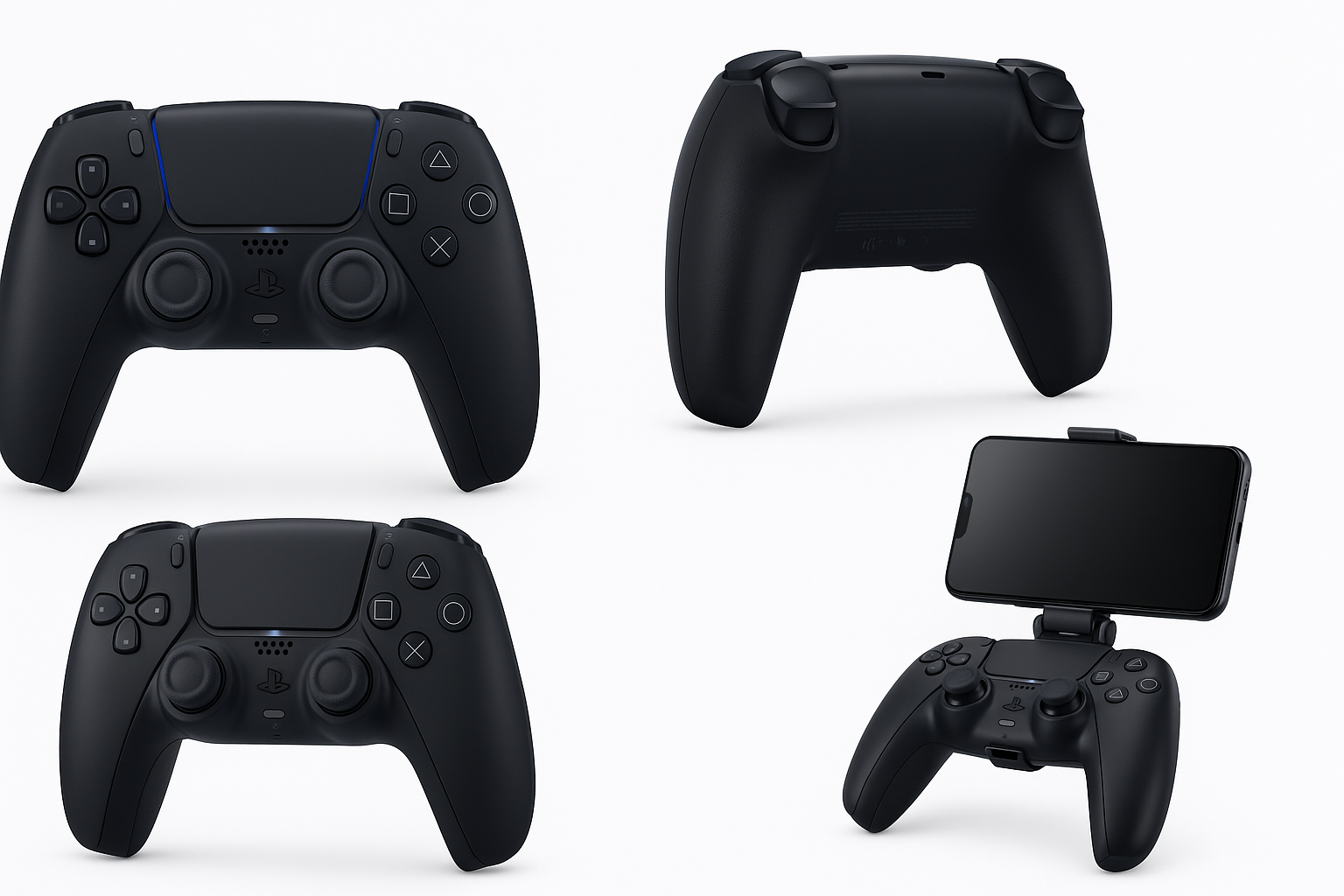
The PlayStation DualSense™ Wireless Controller – Midnight Black is the default gamepad for PS5 and one of the few mainstream controllers that pushes immersion beyond basic rumble. With refined haptic motors, adaptive triggers, motion controls, a built‑in mic, and official support across PS5, Windows PC, Mac, and mobile, it aims to be a versatile all‑rounder rather than a console‑only pad.
On retailers like Amazon, it typically sits in the mid‑range controller bracket around $74.00, making it an appealing option both as a first controller for new PS5 owners and as an upgrade from older DualShock models on PC.
This review focuses on real‑world use: how the Midnight Black DualSense feels in everyday gaming, where it shines, and where you should be aware of compromises.
Typical Use Cases
1. Native PS5 Gaming
For PS5 owners, this is the reference controller the entire platform is built around. Typical PS5 use cases include:
- Single‑player cinematic games (action‑adventures, story‑driven titles)
- Competitive and casual multiplayer (shooters, sports, racers)
- Platformers and family games that use motion and touchpad input
The DualSense integrates tightly with PS5 system features, from the create/share tools to on‑screen button prompts and firmware updates.
2. PC Gaming (Steam, Epic, etc.)
On Windows PCs, the DualSense is increasingly well supported, especially via Steam’s controller framework. Common scenarios are:
- Playing blockbuster releases with native DualSense features (haptics/adaptive triggers) when supported
- Using the controller over USB‑C for lowest latency and guaranteed compatibility
- Wireless play via Bluetooth for couch or living‑room setups
Not every PC game exposes advanced DualSense features, but basic gamepad support (buttons, sticks, standard rumble) is widespread.
3. Mac & iOS
Apple platforms have steadily improved controller integration. The DualSense works well for:
- Apple Arcade titles on Mac or iPhone
- Game streaming from PS5 (via Remote Play) onto Mac or iOS devices
- General controller‑enabled games from the App Store or third‑party stores on macOS
4. Android & Cloud Gaming
On Android phones and tablets, the controller is often used with:
- Remote Play from PS5
- Cloud services such as PlayStation streaming or other game streaming apps
- Local Android games with external controller support
Bluetooth pairing is straightforward, and the compact size of phones makes this an especially good fit with a clip‑style mount.
Performance in Each Scenario
Performance on PS5
Ergonomics and build
The Midnight Black DualSense has a slightly fuller, more rounded shape than the DualShock 4, which suits medium to large hands well while still being manageable for smaller hands. The textured micro‑PlayStation‑icons grip on the back shell improves hold, especially during longer sessions.
Haptic feedback
The standout feature is the advanced haptic system. Instead of simple on/off vibration, it can simulate different textures and sensations—light footsteps, weather effects, vehicle traction, and more—when games implement it. In supported PS5 titles, this produces a more nuanced, immersive feel than traditional rumble.
Adaptive triggers
L2 and R2 can dynamically adjust resistance to simulate tension, such as drawing a bowstring or the kickback of different firearms. In supported games this adds a convincing tactile layer, although some players turn down or disable the feature if they find the extra resistance fatiguing during long sessions.
Controls, mic, and audio
- Face buttons & D‑pad: Sony’s signature feel—slightly soft yet crisp, with familiar layout.
- Analog sticks: Accurate and responsive out of the box, with standard PlayStation stick tension.
- Touchpad: Larger than the DualShock 4’s, doubling as a button and swipe surface in games that use it.
- Built‑in mic & speaker: Convenient for quick party chat or in‑game voice prompts, but not a replacement for a dedicated headset. The mute button is a thoughtful touch.
- 3.5 mm audio jack: Essential for plugging in wired headsets directly.
Battery life
Typical battery life ranges from modest to decent depending on how heavily haptics, adaptive triggers, and speaker are used. Extended haptics‑heavy sessions will shorten playtime between charges compared with simpler controllers.
Performance on PC
Connectivity
- USB‑C (recommended): Easiest way to get full compatibility and lowest latency. Most modern games recognize it as a PlayStation or generic XInput controller.
- Bluetooth: Fine for casual or couch play, but susceptible to PC Bluetooth stack quirks and potential latency or pairing issues on some setups.
Feature support
- Basic controls (buttons, sticks, standard rumble): Widely supported across modern games and platforms, especially via Steam.
- Full DualSense features (advanced haptics, adaptive triggers): Only active in a subset of PC titles with explicit DualSense support.
For most PC players, you’ll get a comfortable, modern controller with good rumble and layout; the advanced features are a bonus when available rather than a guarantee.
Performance on Mac & Mobile
Mac and iOS
Apple’s controller framework recognizes the DualSense for most purposes:
- Smooth navigation in macOS and iOS game menus
- Solid performance in Apple Arcade and compatible App Store games
- Straightforward use with PS Remote Play streaming from your PS5
Advanced haptics and dynamic trigger effects are still limited to specific titles and use cases, but basic performance is very good.
Android
On Android phones and tablets:
- Pairing via Bluetooth is quick
- Controller input is responsive in supported games and cloud services
- Battery life can become more noticeable on long wireless sessions, but for typical mobile play it’s usually adequate
A phone clip or stand can turn the DualSense plus a smartphone into a compact portable gaming setup.
Strengths Across Scenarios
-
Best‑in‑class immersion on PS5
When used with PS5 titles that fully exploit haptics and adaptive triggers, the DualSense delivers some of the most convincing physical feedback of any mainstream controller. -
Comfortable, modern ergonomics
The slightly larger body compared with the DualShock 4 feels substantial but not bulky, with grips that suit a wide range of hand sizes. -
Versatile device support
Official compatibility for PS5, PC, Mac, and mobile means you can own a single controller for most of your gaming ecosystem, simplifying setup and muscle memory. -
All‑in‑one feature set
- Built‑in mic
- Headset jack
- Motion sensors
- Touchpad
- Integrated speaker
This reduces the need for extra accessories and allows developers to design creative control schemes.
-
Refined Midnight Black finish
The all‑black colorway is more understated than the default white/black combination. It blends well in entertainment centers and hides light dirt and discoloration better than brighter shells. -
Reasonable value at its typical price point
Around $74.00, it delivers advanced features that many competing controllers only offer at higher price tiers, particularly the combination of nuanced haptics and variable‑resistance triggers.
Limitations Across Scenarios
-
Battery life is good, not exceptional
Compared with some simpler or more battery‑dense controllers, the DualSense’s advanced features can shorten playtime per charge, especially on haptics‑heavy PS5 titles. -
Standard analog sticks and potential wear
The controller relies on conventional analog stick modules. Over long‑term heavy use, there is still the potential for stick drift, as with many modern controllers that use similar hardware. Replacement or repair requires disassembly or third‑party service. -
PC and non‑PS5 platforms don’t always use the full feature set
On Windows, Mac, iOS, and Android, you usually get excellent basic gamepad functionality, but:- Advanced haptics and adaptive trigger effects are limited to a smaller set of supported titles
- Some games may show Xbox‑style button prompts, leading to minor learning curves (e.g., A vs. Cross, B vs. Circle)
-
Bluetooth variability on PC
Bluetooth performance depends heavily on your adapter and drivers. Some users may encounter pairing inconsistencies, input lag, or dropped connections, particularly on crowded wireless networks or older laptops. -
Midnight Black finish and visible wear
While the color is attractive, darker shells can make micro‑scratches and glossy wear patches more apparent over time, especially on high‑contact areas like triggers and grips. A case or careful handling can mitigate this, but it’s worth noting if cosmetic longevity matters to you. -
Not a pro‑level/customizable pad
Unlike premium controllers with rear paddles, modular thumbsticks, or deep onboard profiles, the standard DualSense focuses on immersion rather than competitive customization. Serious esports players may prefer a higher‑end model with remappable back buttons and adjustable hardware.
Verdict
The PlayStation DualSense Wireless Controller – Midnight Black remains the definitive PS5 controller and a very capable cross‑platform gamepad. Its combination of immersive haptics, adaptive triggers, solid ergonomics, and broad device support makes it an excellent choice for:
- PS5 owners needing a primary or additional controller
- PC players who appreciate Sony’s layout and want occasional access to full DualSense features in supported titles
- Mac, iOS, and Android users looking for a reliable controller that also pairs seamlessly with a PS5
Its main trade‑offs are average‑to‑good (rather than outstanding) battery life, standard analog stick durability, and incomplete utilization of its advanced features outside the PS5 ecosystem.
If you primarily play on PS5 and value immersion, the Midnight Black DualSense is easy to recommend at around $74.00. For players who split time between console and PC or mobile, it offers the convenience of one controller for almost everything, with enough advanced tech to feel current for years to come.