
Samsung LS32B304NWNXGO Review: A 32-Inch Everyday Monitor Focused on Comfort and Simplicity
Introduction
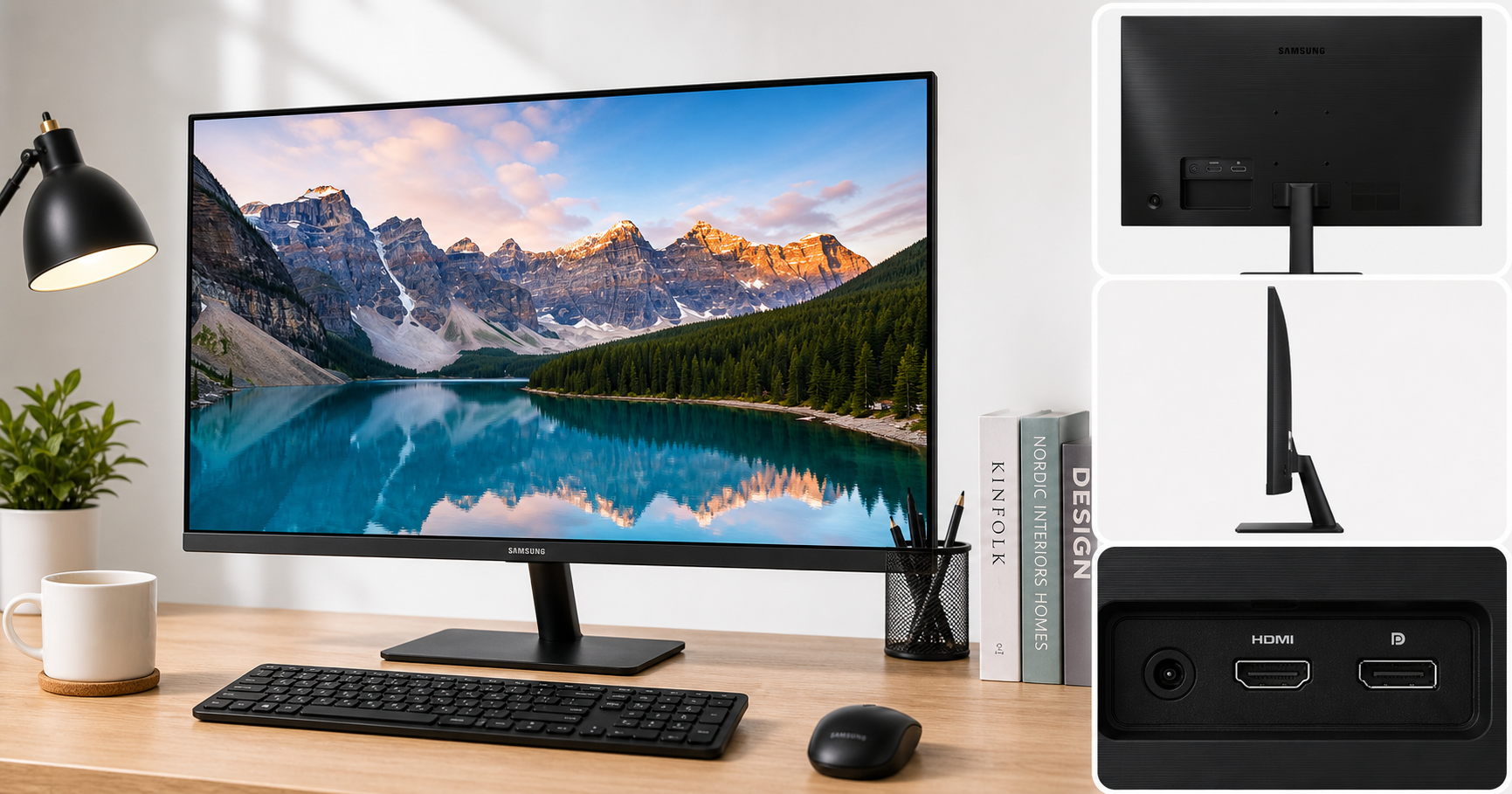
The Samsung 32-Inch Flat Computer Monitor (LS32B304NWNXGO, 2024) is part of Samsung’s Essential/S30B line, targeting users who want a large 32‑inch screen for everyday computing without paying for high‑end gaming or creator features. It combines a 32-inch VA panel, Full HD (1920×1080) resolution, 75Hz refresh rate, AMD FreeSync, and a three-sided borderless design with HDMI and DisplayPort inputs and basic tilt-only stand.
Positioned as a practical, budget‑friendly option, this model focuses on comfort (Advanced Eye Care features), clean aesthetics, and reliability over advanced ergonomics or high pixel density. On many retailers it is often listed around $142.49, placing it in the value segment for 32‑inch monitors.
Typical Use Cases
1. Office and Productivity Work
The 32‑inch screen provides ample space for documents, spreadsheets, and web pages. Users who frequently work with multiple windows will benefit from the extra horizontal and vertical room compared with 24–27‑inch displays.
Typical tasks include:
- Word processing, email, and web browsing
- Spreadsheet work with multiple columns visible
- Remote work setups where a single large monitor replaces a dual‑24" arrangement
2. Light Creative Work and Media Consumption
While this monitor is not marketed as a professional creative display, its VA panel offers better contrast than many budget TN panels, making it suitable for:
- Basic photo editing for web and social media
- Viewing PDFs, design mockups, and presentations
- Streaming video and general entertainment in Full HD
3. Casual and Console Gaming
With a 75Hz refresh rate and AMD FreeSync, the LS32B304NWNXGO improves slightly on standard 60Hz office monitors. It is best suited for:
- Casual PC gaming at 1080p
- Console gaming (current and last‑gen consoles outputting 1080p/60)
- Less demanding or slower‑paced titles where ultra‑high refresh rates are not critical
4. Home and Small Business Use
The simple, three‑sided borderless design and relatively slim profile make it a good fit for home offices and small business environments where aesthetics and footprint matter but advanced features are not necessary.
Performance in Each Scenario
Office and Productivity
For productivity, the LS32B304NWNXGO performs solidly:
- 32‑inch Full HD VA panel gives a large, easy‑to‑read workspace. On Windows and macOS, interface elements appear large, which can be a benefit for users who prioritize legibility over sharpness.
- Three‑sided borderless design helps keep the monitor visually unobtrusive and allows cleaner multi‑monitor setups if a second screen is added later.
- Advanced Eye Care features (typically including flicker‑free backlight and eye‑saver/low‑blue‑light modes) help reduce fatigue during long workdays.
However, the relatively low 1920×1080 resolution at 32 inches results in a modest pixel density. Text and fine UI elements will not appear as crisp as on a 27‑inch 1440p or 24‑inch 1080p display, so detail‑oriented office users may notice softer edges.
Light Creative Work and Media
In casual creative and media usage, the monitor’s strengths and compromises are clear:
- VA technology generally delivers deep blacks and good contrast for this class, improving perceived image depth in movies and games.
- Colors are adequate for non‑critical photo editing, layout review, and general media consumption.
- The large screen and borderless design enhance immersion when watching videos.
At the same time:
- Full HD resolution spread over 32 inches limits fine detail, which is important if you work with high‑resolution photos or detailed vector graphics.
- Color accuracy and factory calibration are aimed at mainstream users, not professional color‑critical work.
Gaming and Motion
For gaming, performance is respectable within its target segment:
- 75Hz refresh rate offers a modest but noticeable improvement in smoothness over 60Hz, especially in desktop use and lighter games.
- AMD FreeSync helps reduce tearing and stuttering when paired with a compatible GPU, especially in the 48–75 FPS range.
- Game Mode presets typically tune color and contrast to make scenes appear more vivid and responsive.
On the other hand:
- The 8 ms (typical) response time is adequate for casual play but lags far behind dedicated gaming monitors in perceived responsiveness and motion clarity.
- 1080p resolution on such a large screen can make aliasing more visible at close seating distances.
- Competitive players seeking 120/144Hz or higher refresh rates and extremely low response times will find this model limiting.
Connectivity and Setup
The LS32B304NWNXGO includes the main ports most users need:
- 1× HDMI for laptops, desktops, and consoles
- 1× DisplayPort for modern PCs
This makes it easy to connect multiple devices and switch between them. Setup is generally straightforward: assemble the stand, connect power and signal cables, and configure resolution/refresh rate in the operating system.
The stand offers tilt adjustment only, with no height, swivel, or pivot. For ideal ergonomics, many users will need to adjust desk height or use a separate VESA‑compatible monitor arm or wall mount.
Strengths Across Scenarios
-
Large 32‑inch Screen at an Accessible Price
At around $142.49, the LS32B304NWNXGO delivers a significantly larger canvas than typical entry‑level 24–27‑inch monitors, which is appealing for users who value screen size over pixel density. -
Borderless, Modern Design
The three‑sided borderless design helps the monitor blend into modern workspaces and makes multi‑monitor layouts look more seamless. -
75Hz + AMD FreeSync
A small but meaningful bump over 60Hz combined with FreeSync offers smoother everyday use and better casual gaming, reducing tearing when frame rates fluctuate. -
VA Contrast and Comfortable Viewing
Compared with low‑end TN panels, the VA panel’s contrast makes text and images pop more, and Samsung’s eye‑care features support longer work sessions. -
Simple, Reliable Feature Set
No complex OSD features or advanced gaming settings to manage—ideal for offices, shared workstations, or users who just want a bigger, easy‑to‑use screen.
Limitations Across Scenarios
-
Low Pixel Density at 32 Inches
Full HD resolution on a 32‑inch panel yields relatively large pixels. Up close, text and fine UI elements can look soft compared with a 27‑inch 1440p or 24‑inch 1080p display. Users who prioritize sharpness for reading and detailed work may want higher resolution. -
Basic Ergonomics
With tilt‑only adjustment and no height, swivel, or pivot, ergonomic flexibility is limited. Many users will need desk risers or a VESA arm for ideal posture. -
Not for Competitive Gaming
The 75Hz refresh rate and typical VA response time are fine for casual play but not tuned for fast‑paced competitive esports where 144Hz+ and very low response times are preferred. -
No USB Hub or Built‑In Speakers (on most regional variants)
This is a streamlined monitor: it does not try to double as a USB docking solution, and in many regions it ships without integrated speakers. Users may need external speakers and will still rely on the PC’s ports for peripherals. -
Limited Color and Calibration Controls
While adequate for everyday tasks, color controls and factory calibration are not on the level of dedicated creator or professional displays, limiting suitability for color‑critical workflows.
Verdict
The Samsung LS32B304NWNXGO 32-Inch Flat Computer Monitor is best understood as a large, comfortable, and straightforward 1080p display designed for offices, home workspaces, and casual use. It favors screen size, simplicity, and eye comfort over ultra‑sharp resolution, advanced ergonomics, or high‑end gaming features.
Choose this monitor if you:
- Want a big 32‑inch screen for documents, web browsing, and general computing
- Value a clean, borderless design that fits modern desks
- Appreciate 75Hz + FreeSync for slightly smoother everyday use and casual gaming
- Prefer a simple, reliable, budget‑oriented monitor without a lot of extras
You may want to look at higher‑resolution or more feature‑rich alternatives if you:
- Do detail‑critical work (design, photography, video) and need sharper text and images
- Play fast‑paced competitive games and demand 144Hz+ and very fast response times
- Require adjustable ergonomics (height, swivel, pivot) or integrated USB hubs and speakers
Overall, the LS32B304NWNXGO is a sensible choice for users who primarily need a large, comfortable, and affordable Full HD workspace, especially in environments where ease of use and visual comfort matter more than pixel density or advanced gaming performance.